Mirzapur Movie Poster AI Photo Editing Prompt 2026
ByRutik Soni
Imagine turning your ordinary photo into a dark, powerful, cinematic movie poster that looks like it belongs on the big screen. You do not need Photoshop skills, an expensive camera, or professional editing experience.
With the right Mirzapur Movie Poster AI Photo Editing Prompt 2026, you can transform a simple portrait into a dramatic crime-thriller-style poster with intense lighting, dusty backgrounds, powerful expressions, and a bold cinematic atmosphere.
Now, you can create your own Mirzapur-inspired AI poster with Prompt Seen and using your personal photo. Just upload your image, paste the prompt, and let an AI image editor create a powerful cinematic look.
What Is a Mirzapur Movie Poster AI Photo Editing Prompt?
A Mirzapur Movie Poster AI Photo Editing Prompt is a detailed instruction that tells an AI image tool how you want your photo to look.
Viral Mirzapur Movie Poster AI Photo Editing Prompt 2026
AI Image Prompt
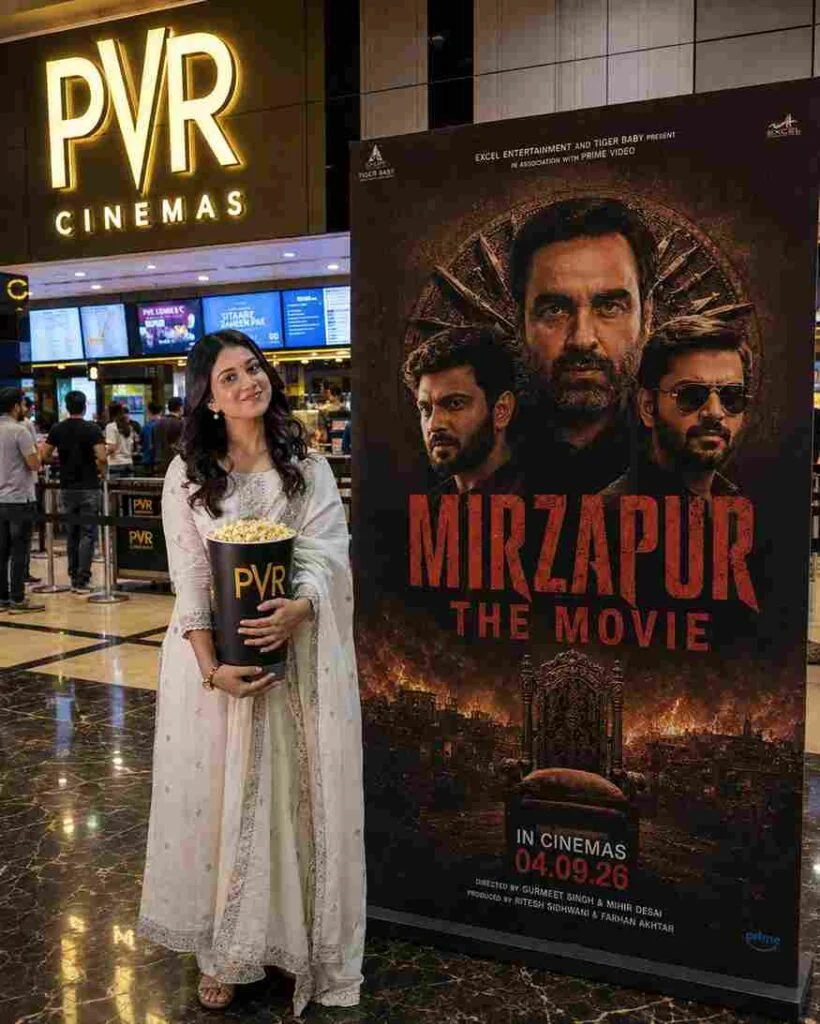
Use the uploaded image as the main reference. Recreate the scene as an ultra-realistic vertical 4:5 photograph while preserving the girl from the uploaded image exactly — same face, facial features, hairstyle, skin tone, expression, body shape, height, pose, clothing, shoes, hand position, and overall appearance. Do not change, beautify, feminize, or redesign her appearance.
Place the girl naturally inside a modern PVR Cinemas movie theatre lobby in India, standing on the left side and holding a large black PVR popcorn bucket filled with popcorn. Keep the same full-body composition, camera angle, proportions, pose, and natural perspective as the reference.
On the right side, add a large realistic freestanding promotional movie poster for “MIRZAPUR THE MOVIE”, featuring a dark brown/black cinematic crime-thriller design, three intense male characters, an ornate circular background, dramatic fiery city imagery, and a throne at the bottom. Add the large distressed red title “MIRZAPUR THE MOVIE” along with realistic movie-poster typography and details, including “IN CINEMAS 04.09.26”.
Keep the illuminated PVR CINEMAS sign, cinema ticket counters, digital screens, people in the background, polished reflective marble floor, ceiling lights, and overall theatre environment realistic and naturally integrated.
Photorealistic DSLR photography, realistic skin and hair texture, natural fabric texture, natural indoor lighting, cinematic warm tones, realistic shadows and reflections, authentic perspective, subtle depth of field, high detail, professional photography, realistic lens characteristics, no CGI, no cartoon effect, no artificial beauty filter, no face alteration.
Strict identity preservation: the girl must remain exactly recognizable as the person in the uploaded image. Do not modify her face, facial structure, hairstyle, skin tone, body proportions, clothing, shoes, pose, or expression.
AI Image Prompt
Use the uploaded image as the main and exact reference for the person. Recreate the scene as an ultra-realistic vertical 4:5 photograph.
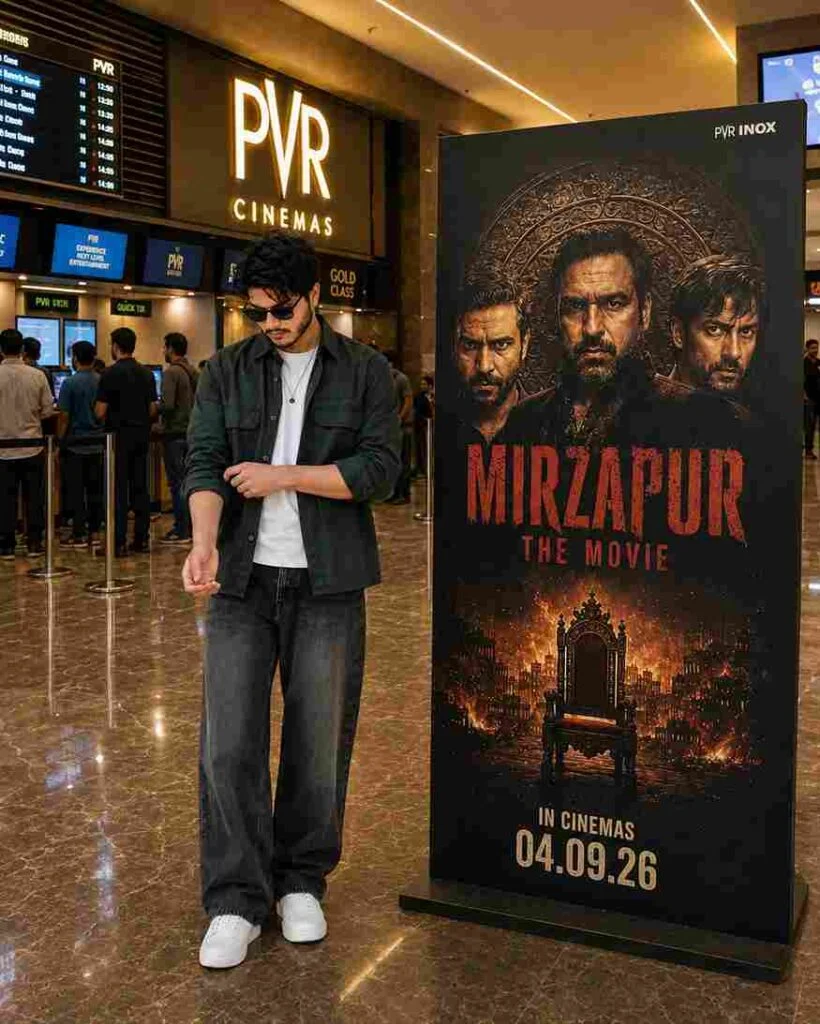
Preserve the person exactly as shown in the uploaded image — same face, facial features, hairstyle, hair texture, skin tone, sunglasses, expression, body shape, height, proportions, pose, hand position, clothing, white T-shirt, dark green overshirt, loose dark jeans, white sneakers, necklace, and overall appearance. Do not beautify, retouch, slim, reshape, redesign, or alter the person in any way.
Place the person naturally on the left side of a modern PVR INOX cinema lobby, standing full-body and completely unobstructed. On the right side, place a tall freestanding “MIRZAPUR: THE MOVIE” promotional poster.
The poster should have a dark crime-thriller aesthetic, featuring three intense male characters, an ornate circular decorative background, a fiery cityscape, a dramatic throne, distressed red “MIRZAPUR” title typography, “THE MOVIE”, and “IN CINEMAS 04.09.26” at the bottom.
Create an authentic premium Indian cinema environment with PVR INOX branding, ticket counters, digital screens, showtime boards, people waiting in queues, queue barriers, polished marble flooring, realistic reflections, glass and dark wood interiors, and warm architectural lighting.
Lighting & Quality
Use proper balanced cinematic lighting — bright enough to clearly show the person’s face, clothing, hands, and full body while maintaining realistic warm cinema ambience. Add soft overhead illumination, natural highlights on the face and clothes, realistic contact shadows, subtle poster illumination, and accurate reflections on the marble floor.
Photorealistic DSLR photography, natural skin texture, realistic hair detail, physically accurate shadows, realistic perspective, HDR, balanced exposure, subtle depth of field, cinematic warm tones, professional photography, highly detailed, natural colors.
No CGI look, no artificial beauty filter, no excessive HDR, no plastic skin, no distorted anatomy, no extra fingers, no altered clothing, no duplicated people, no cropped feet, no food, no popcorn, no unnecessary accessories or props.
Aspect ratio: 4:5 vertical.
Why Is the Mirzapur Movie Poster So Popular?
The Mirzapur Movie Poster AI Photo Editing Prompt 2026 is popular because it lets people turn ordinary photos into dark, cinematic, and powerful movie-style posters within minutes. You don’t need professional editing skills or Photoshop.
With a clear photo and the right prompt, AI can add dramatic lighting, bold colours, realistic backgrounds, and a strong character look.
Mirzapur is highly popular among fans.
Creates a professional movie-poster feel.
No advanced editing skills are needed.
You can use your own photo.
Perfect for Instagram, TikTok, and Facebook.
How to Use the Mirzapur AI Poster
Choose a clear, high-quality photo of yourself.
Open your preferred AI photo editing tool.
Upload your photo to the AI editor.
Copy and paste the Mirzapur AI poster prompt.
Ask AI to keep your face and natural features realistic.
Generate the poster and check the result.
Try the prompt again if you want a different style
Add final text, effects, or colours if needed.
Best Photo Ideas for This AI Prompt
You can experiment with different types of photos.
Solo Portrait
Traditional Outfit
Black Outfit
Outdoor Photo
Close-Up Portrait
Tips for Better Mirzapur-Style AI Poster Results
Use a clear, high-resolution photo.
Keep your face visible.
Describe the background clearly.
Use cinematic lighting words.
Ask for realistic skin texture.
Do not add too many objects.
Use dark and earthy colours.
Keep the subject as the main focus.
Generate multiple versions and choose the best one.
Add the final title and typography during the editing stage if the AI struggles with text.
Common Problems and Solutions
Problem
Simple Solution
The face looks different.
Ask the AI to preserve your facial features.
The image looks cartoonish.
Add “photorealistic” and “DSLR photography”.
The background is too bright.
Request darker cinematic lighting.
The poster looks empty.
Add atmospheric dust, old buildings, and subtle textures
The text looks wrong.
Add the title manually after generation.
The face is blurry.
Upload a sharper, high-quality photo.
Colours look too strong.
Ask for natural, muted cinematic colour grading.
Final Thoughts
The Mirzapur Movie Poster AI Photo Editing Prompt 2026 is a fun way to turn a simple photograph into a dramatic cinematic poster. With one good photo and a detailed prompt, you can experiment with gritty backgrounds, powerful lighting, earthy colours, and a strong crime-drama atmosphere.
The key is to keep the input clear and describe the subject, lighting, background, mood, colours, and poster composition. For the best results, treat the AI output as your first draft and make a few final adjustments afterward.