AI photo editing trends are becoming more creative every day, and the Sabki Apni Apni Aankhein Photo Editing Prompt & Template 2026 is one of the latest concepts gaining attention. This unique editing style focuses on creating an artistic, eye-based composition where every person can have a different eye effect, expression, colour, or visual style.
With AI photo editing tools, you can transform an ordinary portrait into a creative and eye-catching image without spending hours using complicated editing software. You simply need a good-quality photo and a well-written prompt.
In this guide, you will discover how to create the Sabki Apni Apni Aankhein trend, ready-to-use AI prompts, editing tips, common problems, and ways to customise the template according to your own style.
What Is the Sabki Apni Apni Aankhein Photo Editing Trend?
“Sabki Apni Apni Aankhein” is a creative photo-editing concept that focuses on the eyes of different people. The main idea is to give each person a unique eye appearance while maintaining a realistic facial identity.
Depending on your prompt, you can create different eye colours, lighting effects, reflections, emotions, and cinematic details. The final image can look realistic, dreamy, dramatic, romantic, or artistic.
This trend works especially well for:
Couple photos
Friends’ photos
Family portraits
Group pictures
Selfies
Fashion portraits
Instagram and TikTok content
AI-generated profile pictures
Why Is This AI Photo Editing Trend Popular?
The biggest reason behind the popularity of this trend is its simple but creative concept. Eyes naturally attract attention in portraits, so enhancing them can make an ordinary image look much more interesting.
AI editing tools can also preserve important facial details while adding customised visual effects. This makes the final image look more personalised instead of like a generic AI-generated picture.
Another advantage is that you can create multiple versions of the same photo. For example, one version can have natural brown eyes, another can have blue eyes, while another can use a cinematic glowing effect. Also, check: Cinematic Heartbreak AI Photo Editing Prompt 2026
Best Sabki Apni Apni Aankhein AI Photo Editing Prompt
AI Image Prompt
PROMPT:
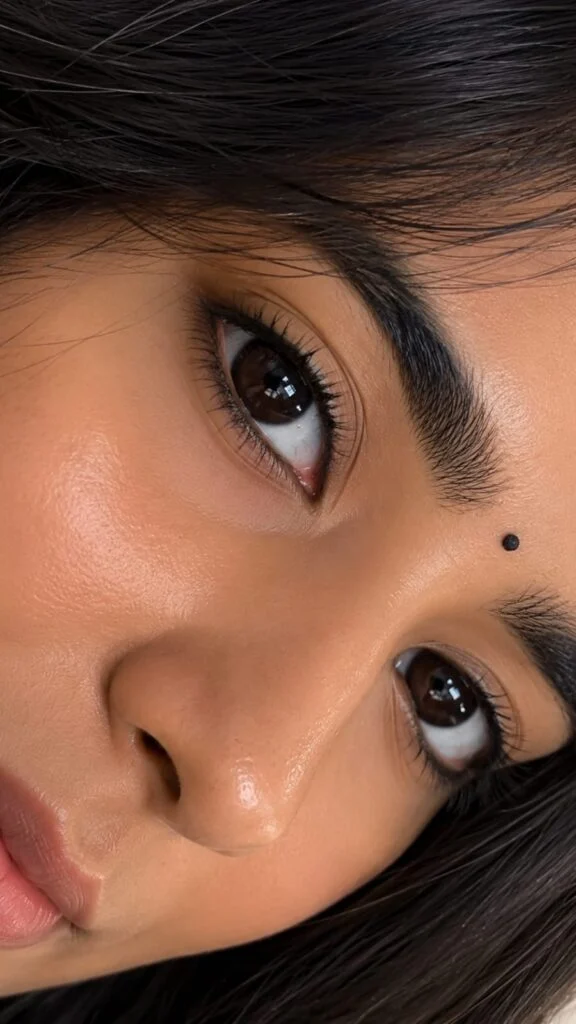
Use the uploaded photo of the person as a STRICT IDENTITY REFERENCE and recreate the portrait in the exact visual style, composition, camera angle, and framing described below.
IDENTITY — HIGHEST PRIORITY
Preserve the person’s exact recognizable identity from the uploaded photo. Keep their original facial structure, face shape, forehead, eyebrows, eye shape and color, eyelashes, nose shape, lips, cheeks, jawline, skin tone, natural skin texture, hairline, hairstyle, hair color, and every unique facial characteristic.
Do not change, beautify, redesign, replace, age, slim, reshape, enlarge, or otherwise alter the person’s identity. The final result must clearly look like the same person from the uploaded photo.
COMPOSITION
Create an ultra-realistic extreme close-up portrait where the person’s face fills almost the entire vertical 9:16 frame.
Rotate the face approximately 90 degrees sideways, creating the distinctive diagonal composition of the reference style.
The camera is extremely close to the face. Both eyes, the nose, eyebrows, eyelashes, cheeks, part of the lips, forehead, and surrounding hair should be visible.
The eyes must be the primary focal point, with the nose occupying the central portion of the composition.
Crop the face very tightly, with almost no background visible.
The final composition should look like a spontaneous flagship-smartphone macro photograph, not a studio portrait.
EYES — MOST IMPORTANT
Both eyes must be extremely sharp and highly detailed.
Preserve the person’s original eye shape, size, color, eyelids, and natural proportions.
Show realistic:
– detailed iris patterns
– natural pupils
– glossy eye moisture
– individual eyelashes
– realistic eyelid folds
– subtle natural veins
– authentic catchlights
– reflections of the surrounding environment
– natural wetness along the lower eyelid
Do not make the eyes larger, brighter, more colorful, or more symmetrical than they naturally are.
FACE & SKIN
Preserve the person’s authentic skin tone and natural facial texture.
Show realistic pores, tiny imperfections, fine facial hairs, subtle highlights, natural shadows, and realistic skin texture.
The skin should have a slightly dewy natural appearance, with soft highlights on the nose, cheeks, and forehead.
No excessive skin smoothing, whitening, airbrushing, or beauty-filter effect.
HAIR
Preserve the person’s exact hairstyle, hairline, hair color, length, texture, and natural parting.
Because of the extreme camera distance, individual hair strands should be clearly visible across the forehead and around the edges of the face.
Hair should look naturally arranged, slightly overlapping the forehead just like a real close-up photograph.
NOSE & FACIAL FEATURES
Keep the person’s original nose structure, nostrils, lips, cheeks, eyebrows, and facial proportions completely unchanged.
The nose should appear naturally large in the composition because of the extremely close camera distance — do not artificially enlarge or redesign it.
Keep all facial proportions anatomically realistic.
EXPRESSION
Use a calm, natural expression with the eyes looking naturally toward the camera.
Do not add a smile or exaggerated emotion unless it is already present in the identity reference.
The expression must remain subtle and realistic.
LIGHTING
Use soft, warm natural indoor lighting.
Create realistic highlights across the forehead, nose, cheeks, and eyes.
Add subtle reflected light inside both eyes.
Use gentle natural shadows around the eyelids, nose, and facial contours.
Avoid harsh studio lighting, dramatic colored lighting, or artificial beauty lighting.
CAMERA & PHOTOGRAPHY
Ultra-realistic macro portrait photography.
Flagship smartphone camera quality.
Extremely close focusing distance.
High optical detail.
Natural depth of field.
Sharp eyes with realistic optical falloff toward less important facial areas.
Natural exposure.
High dynamic range.
Realistic skin rendering.
Authentic photographic imperfections.
4K/8K photorealistic detail.
The final image must look like a real photograph captured with a premium smartphone camera at extremely close range.
COLOR GRADING
Natural warm skin tones.
Realistic dark hair.
Subtle contrast.
Natural highlights.
Authentic photographic colors.
Slightly warm and soft overall appearance.
No excessive saturation.
No artificial HDR.
No cinematic color grading that changes the person’s natural complexion.
FRAMING
9:16 vertical aspect ratio.
Extreme close-up.
Face fills approximately 90–95% of the frame.
Both eyes prominently visible.
Eyes positioned along the central diagonal composition.
Very minimal background.
The result should closely resemble the tight sideways eye-and-face framing of the provided reference image.
REFERENCE IMAGE RULE
Use the uploaded person’s image ONLY for identity.
Use the provided close-up reference image ONLY for composition, camera angle, crop, lighting style, and photographic framing.
Do not copy the reference person’s facial features, eye color, nose, lips, skin characteristics, or identity.
The final image must contain the uploaded person’s identity while reproducing the reference image’s extreme close-up photographic composition.
NEGATIVE PROMPT
different person, changed identity, face swap, facial redesign, altered facial structure, beautified face, beauty filter, plastic skin, airbrushed skin, excessive smoothing, skin whitening, enlarged eyes, redesigned eyes, changed eye color, altered nose, altered lips, slimmer face, different jawline, different hairstyle, different hairline, distorted eyes, asymmetrical eyes, extra eyes, duplicate facial features, deformed nose, unrealistic eyelashes, fake iris, artificial eye reflections, CGI, 3D render, cartoon, anime, illustration, artificial skin, excessive HDR, oversharpening, blurry eyes, low resolution, unrealistic lighting, heavy makeup, exaggerated expression, unnatural proportions, AI artifacts.
FINAL PRIORITY:
Identity accuracy > facial realism > composition > lighting > artistic styling.
AI Image Prompt
PROMPT:
Create an ultra-realistic cinematic vertical 9:16 portrait using the uploaded reference photo of the person as a STRICT IDENTITY REFERENCE.
IDENTITY — HIGHEST PRIORITY
Preserve the uploaded person’s exact recognizable identity with maximum accuracy. Keep their natural facial structure, face shape, forehead, eyebrows, eyes, eye shape, nose, lips, cheeks, jawline, skin tone, skin texture, hairline, hairstyle, hair texture, and all unique facial characteristics exactly consistent with the reference image.
Do not beautify, redesign, replace, slim, reshape, age, de-age, feminize, masculinize, or otherwise alter the person’s identity. The person in the generated image must clearly be the same person from the uploaded reference.
EXACT COMPOSITION
Recreate the reference image’s composition and visual arrangement as closely as possible.
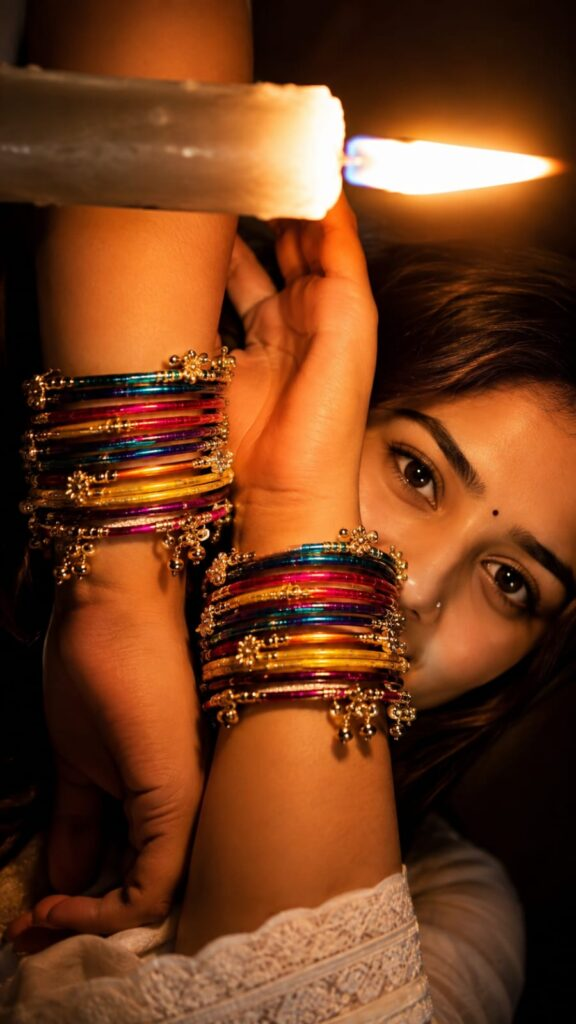
Create a close-up artistic portrait of the person lying sideways with their face positioned toward the right side of the frame. The camera is extremely close to the subject, creating an intimate macro-style composition.
The person’s face is partially framed and partially hidden behind their raised arms. Both forearms/hands are positioned dramatically across the face, creating layered foreground depth.
One arm crosses horizontally through the upper portion of the image, while another arm rises vertically/diagonally near the center of the frame. The eyes remain clearly visible between the arms.
The person’s gaze is directed naturally toward the camera with an intense, soft, emotional expression.
JEWELRY
Cover both wrists with many layers of traditional colorful Indian glass bangles.
Use a rich mixture of:
deep blue
turquoise
bright pink
magenta
golden yellow
orange
red
metallic gold
Add intricate traditional golden decorative bangle elements, tiny hanging gold charms, beads, chains, and ornate details between the colorful bangles.
The bangles should look physically realistic, highly detailed, reflective, layered, and naturally fitted around the wrists.
FACE & DETAILS
Keep the person’s natural facial appearance from the uploaded reference.
Add a tiny elegant silver/diamond-style nose stud on the nose only if it naturally suits the reference person.
Maintain realistic eyelashes, eyebrows, pores, fine facial texture, natural eye reflections, and subtle imperfections.
Do not make the skin plastic or overly smooth.
HAIR
Keep the reference person’s hairstyle and hair texture consistent.
The hair should spread naturally around the head in the background, with individual strands visible. Add realistic warm highlights from the surrounding light.
LIGHTING
Recreate the dramatic warm cinematic lighting of the reference.
Use a strong warm orange/golden light source coming from the upper-right/background area, producing a bright glowing flare and illuminating the face, arms, and bangles.
Create:
warm amber skin illumination
strong golden highlights
soft shadows
cinematic contrast
subtle lens flare
realistic light falloff
glowing highlights around the hair
natural reflections on the bangles
The background should be dark, warm brown/black, softly blurred, and atmospheric.
CAMERA & PHOTOGRAPHY
Extreme close-up portrait photography.
Vertical 9:16 composition.
Professional DSLR/mirrorless look, approximately 85mm–105mm portrait lens, shallow depth of field, wide aperture around f/1.8–f/2.0.
Sharp focus primarily on the eyes and facial details, with realistic depth-of-field falloff toward the foreground bangles and background.
Ultra-realistic skin texture, realistic optical rendering, natural bokeh, cinematic color grading, high dynamic range, professional editorial photography.
COLOR & MOOD
Warm Indian festive aesthetic mixed with dramatic cinematic portrait photography.
Rich orange and golden tones with vibrant jewel-colored bangles.
The final image should feel luxurious, emotional, mysterious, intimate, traditional, and highly aesthetic.
IMPORTANT
Match the reference image’s:
camera angle
framing
body positioning
arm placement
face placement
eye visibility
bangle arrangement
lighting direction
warm color palette
background mood
depth of field
overall visual style
Only replace the original person’s identity with the identity from the uploaded reference photo.
No text, no watermark, no Instagram interface, no logos, no extra people, no distorted hands, no extra fingers, no malformed jewelry, no duplicate limbs, no artificial-looking skin.
FINAL OUTPUT: Ultra-realistic cinematic Indian portrait, vertical 9:16, extremely detailed, photorealistic, natural skin texture, realistic hands and jewelry, premium DSLR photography quality.
AI Image Prompt
PROMPT:
Use the uploaded reference photo of the person as a STRICT IDENTITY REFERENCE. Preserve the person’s exact recognizable identity, facial structure, face shape, skin tone, eye shape and color, eyebrows, eyelashes, nose, lips, cheeks, jawline, hairline, hairstyle, hair texture, and all unique facial characteristics.
Do not change, beautify, redesign, replace, age, slim, reshape, enlarge, or alter the person’s identity.
Create an ultra-realistic, aesthetic, romantic, emotional extreme close-up portrait of the same person.
POSE & EXPRESSION
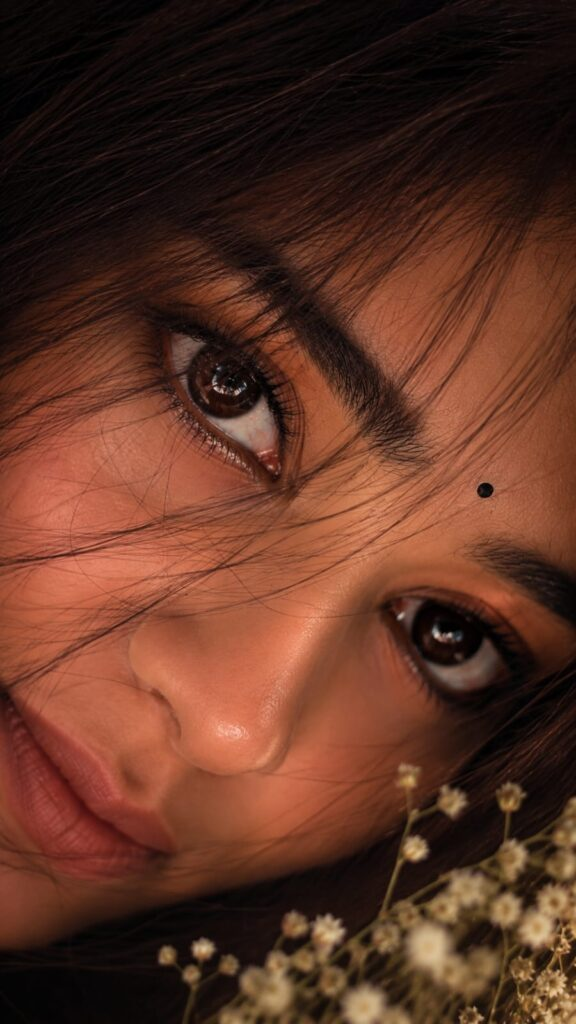
The face is positioned at a slightly diagonal/sideways angle, filling almost the entire frame.
The person is looking directly into the camera lens with both eyes clearly visible and sharply focused.
The expression should communicate deep love, emotional connection, softness, and a quiet romantic feeling — subtle and natural, not exaggerated or sad.
The eyes should look slightly emotional and glossy, as if holding a very subtle tear, while still expressing warmth and affection.
Keep the lips naturally relaxed and slightly parted.
HAIR
Allow natural dark hair strands to gently fall across the forehead and partially over the eyes.
Several fine strands should naturally cross in front of the eyelashes and cheeks, creating a soft, effortless romantic aesthetic.
Hair must remain realistic and consistent with the person’s original hairstyle, color, length, and texture.
EYES
The eyes are the main focal point.
Preserve the person’s original eye shape and color.
Create extremely realistic:
– glossy emotional eyes
– detailed iris texture
– natural pupils
– realistic catchlights
– subtle eye moisture
– individual eyelashes
– natural eyelid texture
– tiny realistic reflections
The eyes should communicate love and emotional eye contact without looking artificial.
SKIN
Preserve the person’s authentic skin tone and natural facial texture.
Show realistic pores, fine facial hairs, subtle imperfections, natural highlights, and soft skin texture.
Give the skin a gentle dewy glow, especially around the cheeks, nose, and forehead.
Avoid plastic skin, excessive smoothing, whitening, or beauty-filter effects.
LIGHTING
Use soft warm romantic lighting, similar to golden-hour indoor window light.
Create gentle warm highlights across the face with subtle shadows around the eyes and nose.
Add a delicate cinematic glow around the edges of the hair.
Use soft, dreamy bokeh in the background with warm cream, amber, and subtle pink tones.
ROMANTIC DETAILS
Add a few tiny out-of-focus white baby’s-breath flowers near the lower foreground and edge of the frame.
Keep them subtle and blurred so they complement the portrait without covering the face.
Add a very soft atmospheric glow and delicate lens bloom for a dreamy romantic feeling.
CAMERA & QUALITY
Ultra-realistic professional macro portrait photography.
Premium smartphone/DSLR-quality close-up.
85mm macro portrait aesthetic.
Extremely sharp eyes.
Natural optical depth of field.
Realistic skin rendering.
High dynamic range.
Natural photographic imperfections.
Soft cinematic bokeh.
Photorealistic 4K/8K detail.
COMPOSITION
Vertical 9:16 aspect ratio.
Extreme close-up.
Face fills approximately 90–95% of the frame.
Both eyes prominently visible.
Eyes positioned as the strongest focal point.
Minimal background.
Slight diagonal face orientation.
The final image should feel like an intimate romantic Instagram aesthetic photograph, captured spontaneously at very close range.
COLOR GRADING
Warm cinematic skin tones.
Soft golden highlights.
Subtle pink/peach undertones.
Deep natural dark hair.
Gentle contrast.
Soft shadows.
Dreamy romantic atmosphere.
No excessive saturation or artificial HDR.
IDENTITY & REFERENCE RULE
Use the uploaded person’s image ONLY for identity and facial characteristics.
Recreate the requested composition, camera angle, emotional expression, lighting, hair placement, and romantic photographic aesthetic without copying another person’s facial features.
Identity accuracy must remain the highest priority.
NEGATIVE PROMPT
different person, altered identity, face swap, facial redesign, changed facial structure, beautified identity, plastic skin, excessive retouching, skin whitening, enlarged eyes, changed eye color, altered nose, altered lips, slimmer face, different hairstyle, unrealistic hair, distorted eyes, extra eyes, duplicate features, fake iris, unnatural tears, exaggerated sadness, fake smile, heavy makeup, CGI, 3D render, cartoon, anime, illustration, artificial skin, excessive HDR, oversharpening, blurry eyes, low resolution, unrealistic lighting, excessive bokeh, unnatural proportions, AI artifacts.
How to Use the Sabki Apni Apni Aankhein Photo
Creating this trend is relatively simple when you use a modern AI photo-editing tool.
Download or save the final image when you are satisfied.
Choose a clear, high-quality photo where the eyes and face are clearly visible.
Upload the photo to your preferred AI photo editing tool.
Copy your favourite Sabki Apni Apni Aankhein prompt from this guide.
Paste the prompt into the AI editor.
Mention specific eye colours or effects for each person if needed.
Ask the AI to preserve the original face, identity, clothes, and background.
Generate the edited image and review the result.
If the eyes look unnatural, regenerate with “make the eye effect realistic and subtle.”
Sabki Apni Apni Aankhein Template Ideas
You can customise the template in several ways depending on the type of content you want to create.
Natural Eye Template
Use realistic eye colours with subtle highlights and natural skin tones. This is best for profile pictures and normal portraits.
Cinematic Template
Add dramatic lighting, reflections, shallow depth of field, and professional color grading for a movie-style result.
Couple Template
Give both partners different eye colours while keeping their faces and expressions unchanged.
Friendship Template
For group photos, give every friend a different eye color or unique iris pattern.
Fantasy Template
Add subtle glowing eyes, magical reflections, and artistic iris details for a more creative result.
Tips for Better AI Results
Use a high-quality original photo.
Make sure the eyes are clearly visible.
Avoid extremely blurry images.
Clearly tell the AI to preserve facial identity.
Ask for realistic iris details.
Avoid excessive glow effects.
Use specific eye colors when editing multiple people.
Generate multiple versions if the first result is not perfect.
Keep the background unchanged when you want a realistic portrait.
Use cinematic lighting for a more professional appearance.
Common Issues & Solutions
Common Issue
Solution
Eyes look unnatural
Add “realistic iris texture, natural reflections, and subtle eye enhancement” to the prompt.
Face identity changes
Tell the AI to preserve the original facial features, identity, and face shape.
Wrong eye colors
Clearly specify the exact eye color for each person in the prompt.
Background changes
Add “keep the original background completely unchanged.”
Too much glow
Use subtle lighting and reduce the intensity of the eye effects.
The image becomes blurry
Upload a high-resolution photo and request sharp, detailed, photorealistic results.
Eyes lose natural detail
Ask for realistic pupils, iris patterns, eyelashes, and natural catchlights.
Different faces look too similar
Clearly instruct the AI to give each person a unique eye appearance while preserving their identities.
How to Make the Trend More Attractive
The key to creating a professional-looking image is balance. The eyes should stand out, but they should not look disconnected from the rest of the portrait.
Use natural lighting, realistic reflections, detailed iris textures, and subtle color grading. If you are editing a group photo, make each person’s eyes different while maintaining the same overall photography style.
You can also experiment with warm, cool, dark, dreamy, or cinematic styles to create different versions of the same template.
Conclusion
The Sabki Apni Apni Aankhein Photo Editing Prompt & Template 2026 is a simple and creative way to transform ordinary portraits into unique AI-edited images. By focusing on realistic eye colors, iris details, reflections, and lighting, you can create an eye-catching result while keeping the original person recognisable.
The prompts in this guide can be customised for selfies, couples, friends, family pictures, and group portraits. You can also experiment with cinematic, romantic, fantasy, colourful, and moody eye effects.
For the best results, always start with a clear image and use specific instructions to preserve facial identity. With the right prompt and a little experimentation, you can create your own unique version of the Sabki Apni Apni Aankhein trend in 2026.