Some photos capture a moment, while others tell a whole story without saying a single word. If you want to turn an ordinary portrait into a deeply emotional, cinematic heartbreak scene, AI photo editing can help you create that mood in just a few steps.
The Cinematic Heartbreak AI Photo Editing Prompt 2026 is designed to transform your photo into a dramatic and emotional visual with soft lighting, lonely expressions, cinematic colours, realistic shadows, and a powerful atmosphere. Whether you want to show a broken-heart moment, lost love, emotional memories, or a silent goodbye, the right AI prompt can make your image feel like a scene from a movie.
In this article, with PromptSeen, you can easily create a realistic cinematic heartbreak photo using ChatGPT and a ready-to-use AI editing prompt.
What Is a Cinematic Heartbreak AI Photo Editing Prompt?
A cinematic heartbreak prompt is a detailed instruction that tells an AI image editor how to change the mood and appearance of your photo.
Instead of simply saying “make my photo sad”, you describe specific elements such as:
Emotional facial expression
Moody cinematic lighting
Soft shadows
Dark or muted colours
Lonely atmosphere
Rainy or cloudy background
Film-style composition
Realistic skin texture
Depth and natural details
These instructions help the AI understand the exact feeling you want to create.
Cinematic Heartbreak AI Photo Editing Prompt
AI Image Prompt
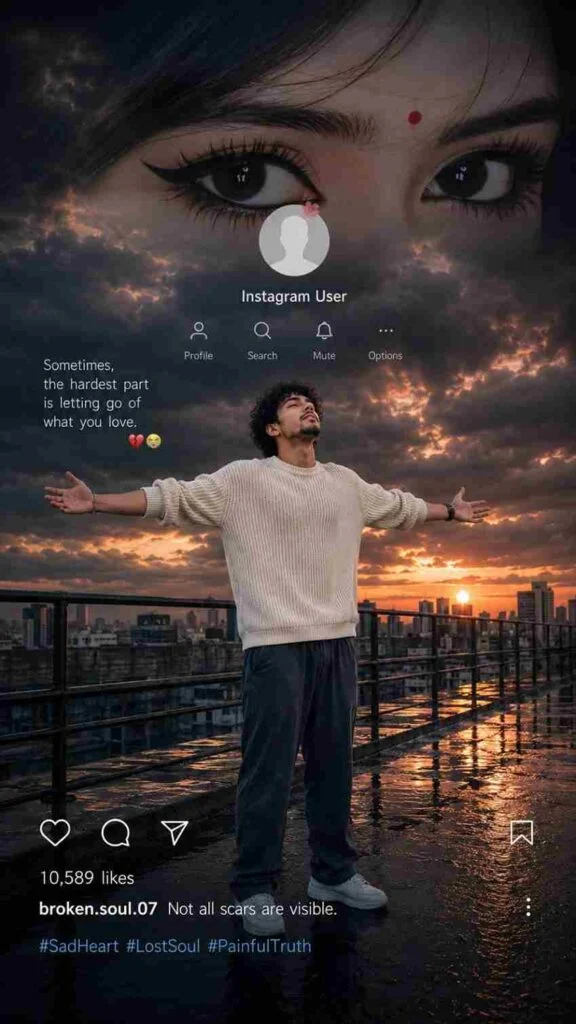
Create an ultra-realistic cinematic vertical 9:16 Instagram heartbreak edit based on the uploaded reference image. Preserve the boy’s exact facial identity, face shape, hairstyle, curly hair texture, skin tone, body proportions, natural appearance, clothing, and overall identity with maximum accuracy. Do not redesign, beautify, replace, age, or alter his face.
Place the boy naturally on a wet rooftop/industrial walkway at sunset. He is standing in the center of the scene with both arms fully spread wide, palms open, chest slightly lifted, and his face tilted upward while looking toward the sky, expressing deep heartbreak, loneliness, emotional pain, and surrender. Keep his same cream/off-white knitted sweater, loose dark pants, and white sneakers. His clothing should look naturally wet and realistic, with subtle reflections on the wet ground.
Create a dramatic dark stormy sky filled with heavy clouds, warm orange and golden sunset light breaking through the clouds, cinematic blue-gray shadows, and a glowing sun near the city skyline. Add a realistic modern cityscape in the background with distant buildings, rooftop railings, wet reflective flooring, puddles, atmospheric haze, and realistic sunset reflections.
At the top, create a large cinematic close-up of a girl’s expressive eyes blended naturally into the dark cloudy sky, suggesting memories of someone he has lost. Add subtle emotional depth without making the eyes look artificial.
Include a realistic Instagram-style profile overlay in the upper-middle area with a circular profile picture placeholder, the text “Instagram User”, and minimal Instagram-style icons for Profile, Search, Mute, and Options.
Add the heartbreak quote on the left side:
“Sometimes, the hardest part is letting go of what you love.”
followed by 💔😭
At the bottom, include a realistic Instagram post interface with heart, comment, share, and bookmark icons, “10,589 likes”, username “broken.soul.07”, caption “Not all scars are visible.”, and hashtags “#SadHeart #LostSoul #PainfulTruth”.
Use photorealistic DSLR quality, cinematic HDR, realistic skin texture, natural facial details, realistic fabric texture, dramatic volumetric lighting, soft atmospheric depth, accurate reflections, subtle film grain, high dynamic range, realistic shadows, and professional color grading. Make the entire composition emotionally powerful, melancholic, cinematic, and believable, like a real viral Instagram heartbreak edit. No cartoon look, no artificial face, no distorted hands, no extra fingers, no duplicate limbs, no warped body, no blurry face, no text distortion.
AI Image Prompt
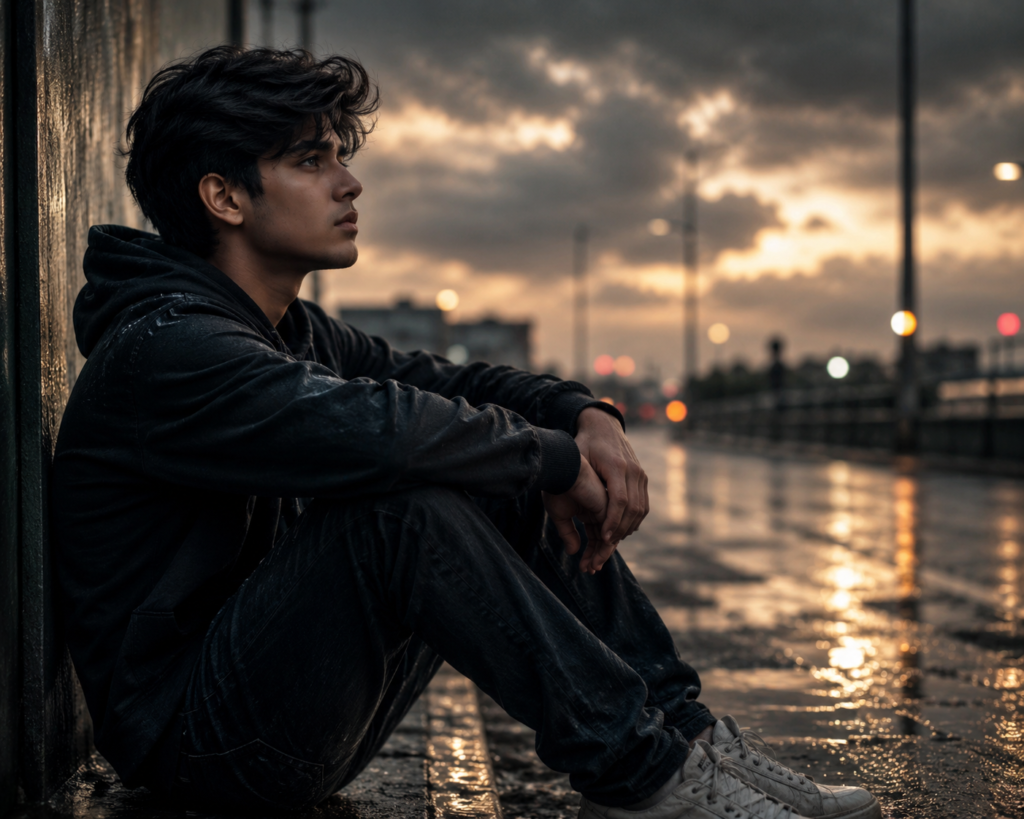
Create an ultra-realistic cinematic heartbreak portrait using the uploaded photo as the main reference. Preserve the person’s original face, identity, facial features, skin texture, hairstyle, body proportions, clothing, and natural appearance. Create a deep emotional and lonely atmosphere with soft moody lighting, subtle shadows, muted cinematic colors, gentle highlights, and a slightly melancholic expression. Add a realistic blurred background with a cloudy evening atmosphere, subtle rain reflections, and soft atmospheric depth. Use dramatic movie-style composition, natural skin tones, realistic textures, shallow depth of field, soft bokeh, and emotional cinematic color grading. Make the final image look like a powerful heartbreak scene from a romantic drama movie, highly detailed, photorealistic, 4K quality, natural and visually emotional.
How to Create a Heartbreak Photo with ChatGPT
Open ChatGPT and start a new chat.
Upload the photo you want to edit.
Paste the Cinematic Heartbreak AI Photo Editing Prompt.
Ask ChatGPT to preserve the original face and identity.
Add a sad and emotional cinematic atmosphere.
Add rain, cloudy skies, soft shadows, or sunset lighting.
Use realistic skin texture and natural facial details.
Generate the edited image.
Review the result and make small changes if needed.
Save the final heartbreak photo in high quality.
Best Heartbreak Effects to Add
Rainy Atmosphere
Rain can instantly create a more emotional and lonely feeling. You can ask the AI to add realistic rain, wet surfaces, and soft reflections.
Emotional Sunset
A warm sunset can represent memories, separation, or the end of a relationship. Combine it with soft shadows and a slightly faded colour grade.
Lonely Night Scene
A nighttime city background with blurred lights can create a dramatic movie-like effect.
Dark Cinematic Colour Grading
Muted colours, gentle contrast, and deeper shadows can make the image feel more serious and emotional without making it look unrealistic.
Soft Light
Soft side lighting can highlight the face while keeping the rest of the image slightly darker, creating a powerful cinematic effect. Also try; Awarapan 2 Movie AI Photo Editing Prompts 2026
Best AI Tools You Can Use
You can create this type of edit with several AI image editing platforms, depending on the features available in the tool.
Popular options include:
ChatGPT image generation/editing
Google Gemini
Midjourney
Leonardo AI
Adobe Firefly
Flux-based image tools
The exact result can vary between tools, so try the same prompt in different platforms if you want to compare styles.
Common Mistakes to Avoid
Using a Low-Quality Photo
A blurry or heavily compressed image can make it difficult for the AI to preserve facial details.
Using a Very Short Prompt
Simply writing “make it cinematic and sad” may not give you the exact result you want. Describe the lighting, background, mood, colours, and realism.
Changing Too Many Things
If you ask the AI to completely change the face, clothes, body, background, pose, and lighting at the same time, the final result may look artificial.
Overusing Dark Effects
A heartbreak edit does not have to be completely black or extremely dark. Subtle shadows and controlled contrast usually create a more realistic cinematic appearance.
Ignoring the Original Identity
If you want the edited image to look like the original person, clearly tell the AI to preserve their identity and facial features.
Tips for a More Viral-Looking Heartbreak Edit
If you are creating the image for Instagram, TikTok, Pinterest, or YouTube Shorts, focus on emotion and storytelling.
Try combining:
Cinematic lighting
Emotional facial expression
Soft background blur
Rain or sunset
Film-style colour grading
Natural skin texture
Dramatic composition
High-resolution details
A simple photo can become much more powerful when the edit makes viewers feel that there is a story behind the image.
Final Thoughts
The Cinematic Heartbreak AI Photo Editing Prompt 2026 is a simple way to turn an ordinary portrait into an emotional, movie-style visual. The key is not just adding dark colours or rain—it is creating a complete atmosphere through lighting, expression, background, shadows, and realistic details.
For the best results, start with a clear photo, use the ready-made prompt above, and make small changes until the mood matches your story. Most importantly, tell the AI to preserve the original person’s identity so the final image remains realistic and recognisable.