Dark Aesthetic Music Player AI Photo Editing Prompt 2026
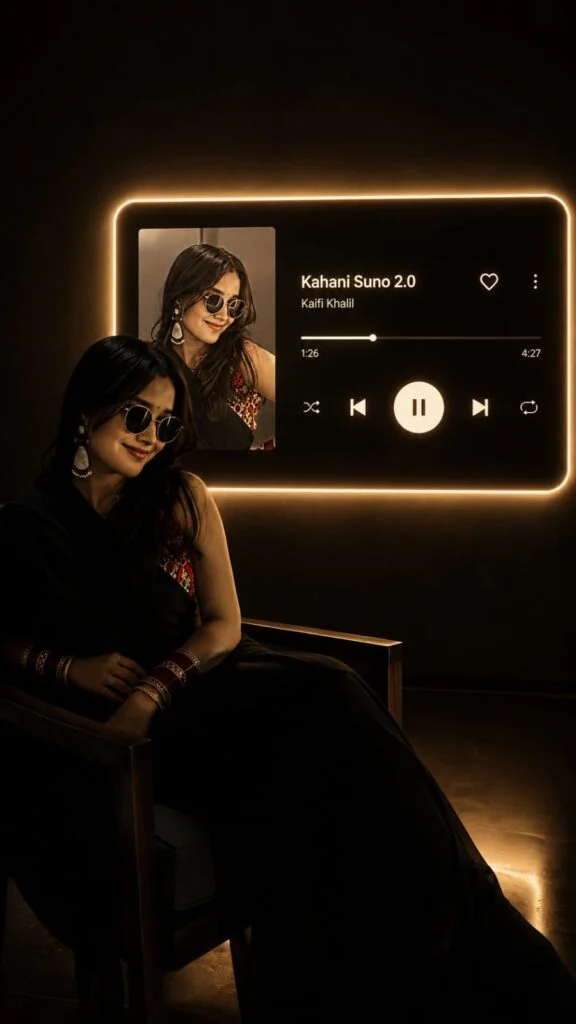
Have you ever seen a photo that looks like it belongs inside a music video? A person sitting in a dark room, a glowing music player on the wall, soft cinematic light, and a favourite song displayed in the background instantly create a different mood.
Now, you can create the same dark aesthetic music player photo using AI, even if you have no professional editing skills. All you need is a clear photo, a good AI photo editing tool, and the right prompt.
The Dark Aesthetic Music Player AI Photo Editing Prompt 2026 can turn a simple portrait into a stylish, emotional, and cinematic music-themed photo. You can add your favourite song, artist name, album artwork, glowing controls, and a dark background to make the final image look like a professional music poster.
What Is the Aesthetic Music Player Photo Editing Prompt?
This AI photo editing prompt is designed to transform your normal picture into a dark, cinematic music-player scene.
The main idea is simple. Your original photo remains the main focus while AI creates a dark environment around you. A large glowing music-player interface can appear behind the subject with elements such as:
Why Is This AI Photo Editing Trend So Popular?
Normal selfies can sometimes look repetitive. AI music-player edits give your photos a completely different story. Also try the Mirzapur Movie Poster Photo Editing Prompt
The dark background creates a mysterious mood, while the glowing music player becomes an important part of the composition. You can also personalise the edit with a song that matches your feelings or personality.
This style works especially well for:
Best Dark Aesthetic Music Player AI Prompt
How to Use the Dark Aesthetic Music Player Prompt
Creating this photo is very easy, even if you are completely new to AI editing.
How to Make Your AI Photo More Realistic
Getting a good result depends on both your original photo and the instructions you give the AI.
Try these simple tips:
Common Problems and Easy Solutions
| Problem | Solution |
|---|---|
| Face looks different. | Tell AI to preserve your exact identity and facial features. |
| The image looks too bright | Ask for low-key lighting and deeper shadows. |
| The music player looks fake. | Describe realistic buttons, reflections, and light spill. |
| The text is incorrect | Regenerate and clearly specify the song and artist. |
| Hands look strange | Use a simpler pose and regenerate. |
| The background is too busy | Ask for a minimal, almost completely dark room. |
| The photo looks cartoonish | Add “photorealistic” and “realistic photography”. |
| The image is cropped badly | Specify 9:16 vertical composition. |
Tips for a Better Music Player Photo
Final Thoughts
The Dark Aesthetic Music Player AI Photo Editing Prompt 2026 is a simple way to give your ordinary portrait a cinematic and music-inspired makeover.
Upload a clear photo, use the prompt, add your favourite song and artist, and let AI create the scene. For the best result, keep your instructions specific and ask the AI to preserve your original identity, realistic lighting, natural proportions, and facial details.
Whether you want a sad, romantic, mysterious, luxury, or late-night music aesthetic, this trend gives you plenty of creative options. So choose your favorite song, upload your photo, and create a music-player portrait that looks like it came straight from a cinematic album cover.