Best Couple AI Photo Editing Prompts 2026 | ChatGPT Prompts
ByRutik Soni
Want to turn your normal couple photos into beautiful, romantic, and cinematic images? With the right AI photo editing prompt, you can create stunning couple portraits without needing advanced Photoshop skills.
In 2026, AI photo editing tools like ChatGPT can help you transform your existing photos while keeping the couple’s faces, expressions, outfits, and natural details realistic. You simply upload your photo, add a clear prompt, and let the AI create the desired look.
In this guide, with PromptSeen, you can easily discover creative AI photo editing prompts and turn your couple photos into stunning, romantic visuals.
What Are Couple AI Photo Editing Prompts?
Couple AI photo editing prompts are written instructions that tell an AI tool how you want your photo to look. AI can turn a simple couple photo into a beautiful romantic scene with the right prompt. You can try different backgrounds, lighting, outfits, and moods to create unique and realistic couple portraits.
For example, you can ask AI to create:
A romantic sunset couple portrait
A cinematic wedding photo
A rainy couple photoshoot
A luxury couple portrait
A traditional outfit couple photo
A soft aesthetic couple picture
A Bollywood-style romantic scene
A realistic beach couple photo
The better and more specific your instruction is, the easier it is for the AI to understand your desired result.
Why Couple AI Photo Prompts Are Trending in 2026
AI couple photos are popular because they allow people to experiment with different photography styles without arranging an expensive photoshoot.
A single photo can be transformed into a sunset portrait, wedding scene, beach photoshoot, cinematic movie frame, or aesthetic social media image.
This makes AI editing useful for Instagram posts, TikTok videos, Facebook posts, WhatsApp Status, profile pictures, and creative projects.
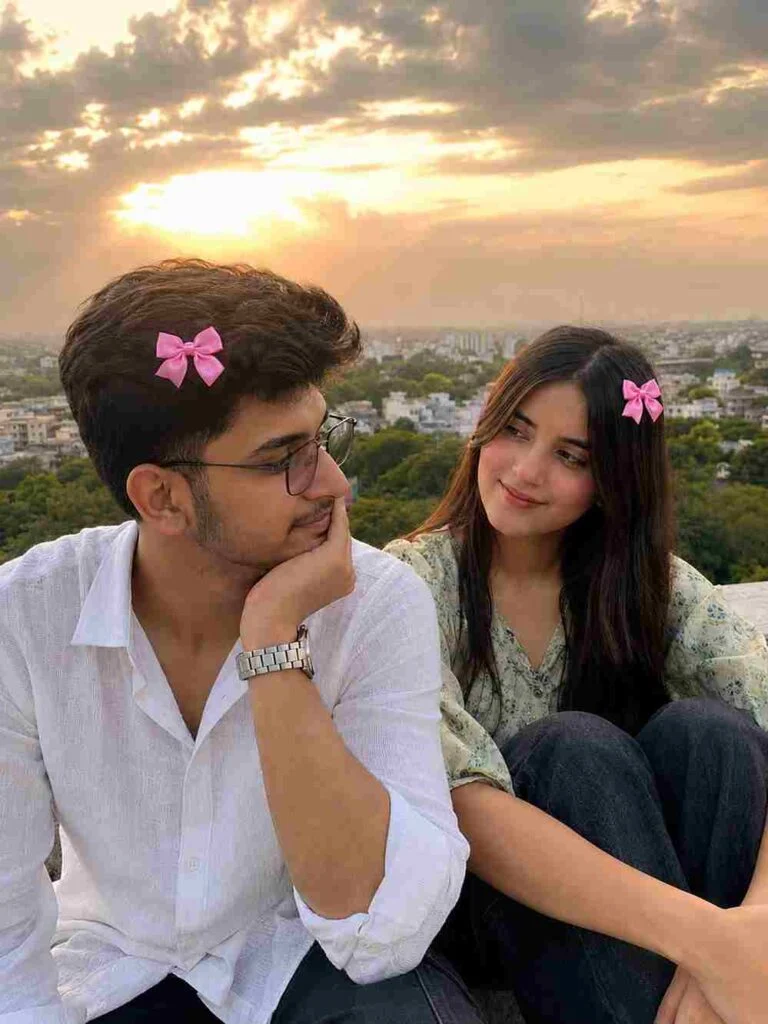
Use the uploaded couple images as the ONLY visual reference. Recreate the SAME couple with maximum identity accuracy. Preserve their facial features, hairstyle, skin tone, body proportions, pose, composition, framing, clothing, expressions, camera angle, background, lighting, and overall mood.
Create an ultra-realistic candid South Asian couple photograph. The man wears a loose white linen shirt with rolled-up sleeves and a silver metal watch, resting his cheek on his hand while looking affectionately toward the girl. The girl wears a light green floral top and dark loose jeans, sitting beside/behind him with her knees drawn up and looking lovingly at him.
Add matching small, vivid pink satin hair bows naturally attached to both hairstyles. The bows must be clearly pink, slightly brighter and more saturated than pastel pink, with elegant rounded loops, a neat center knot, short flowing ribbon tails, subtle satin shine, realistic fabric texture, and natural hair integration. Keep the bows small, tasteful, symmetrical in style, and firmly attached to the hair.
Use warm golden-hour sunlight, natural backlighting, subtle lens flare, realistic skin pores and hair strands, authentic smartphone-camera photography, soft realistic depth of field, natural shadows, and cinematic but believable colors.
Strictly avoid: beauty filters, plastic skin, excessive smoothing, HDR, oversharpening, distorted anatomy, extra fingers, altered faces, unrealistic hair, oversized bows, dull/pastel bows, artificial-looking details, or an obvious AI-generated appearance.
AI Image Prompt
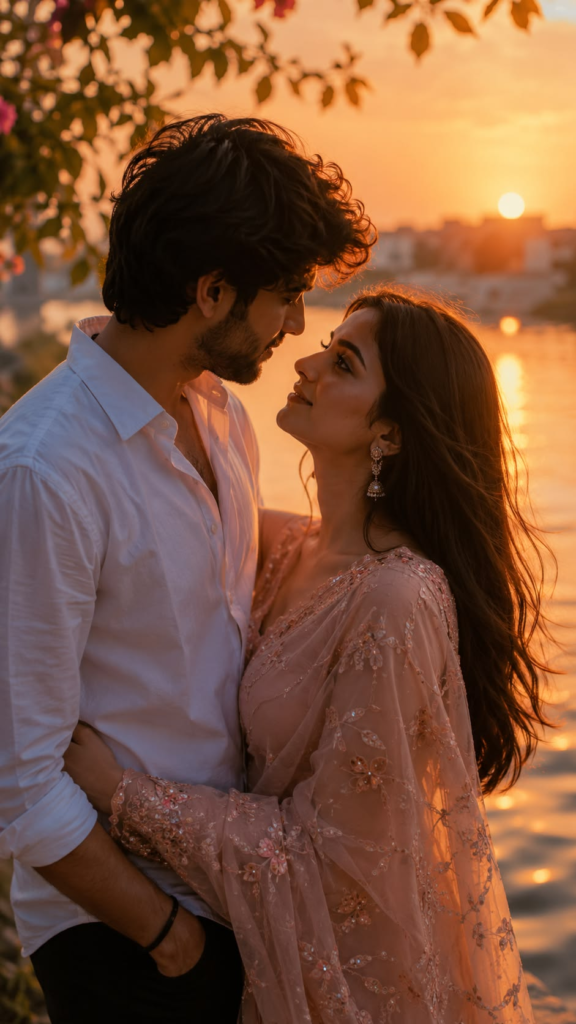
Create an ultra-realistic romantic couple portrait using the uploaded photo as the main reference. Keep both people’s original faces, identities, facial features, skin texture, hairstyles, and natural expressions unchanged. Show the couple standing close together in a loving pose, looking into each other’s eyes beside a calm lake during golden sunset. Add warm orange sunlight, beautiful sunset reflections on the water, soft natural shadows, gentle backlighting, cinematic depth of field, realistic clothing and fabric details, natural skin tones, professional DSLR photography, ultra-detailed 8K HDR quality, and a dreamy romantic atmosphere. Keep the final image realistic, elegant, and naturally photographed.
AI Image Prompt
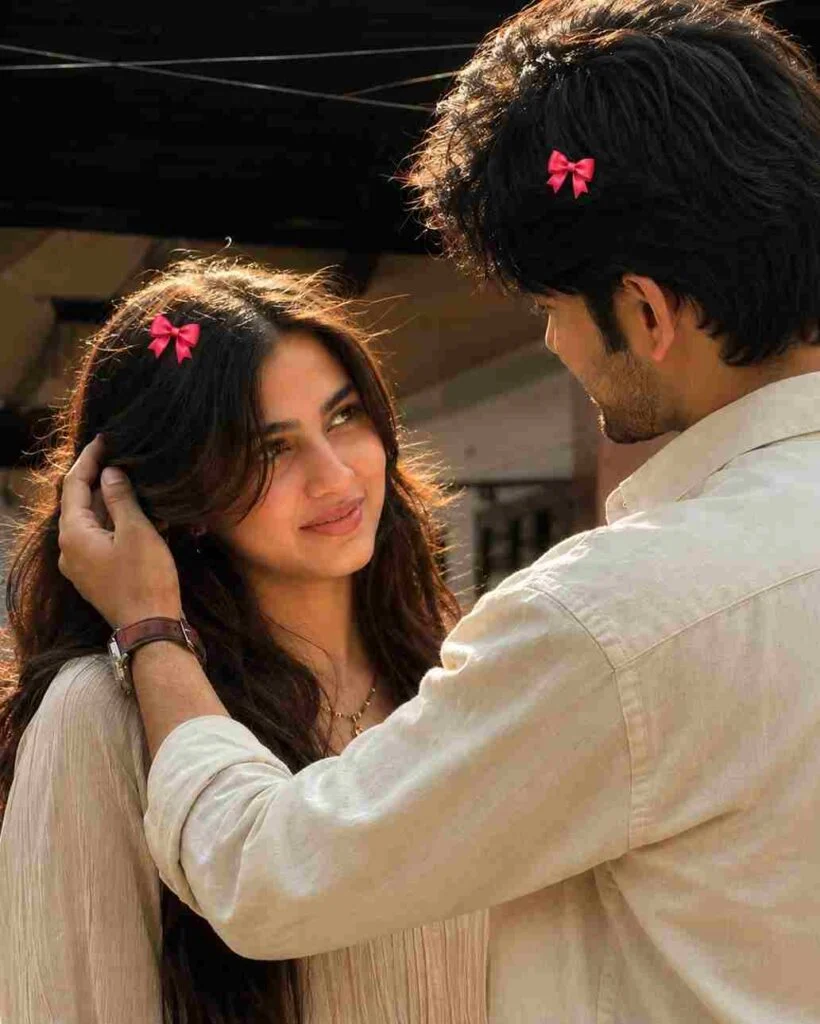
Recreate the uploaded reference image as a highly realistic candid smartphone photograph. Preserve the same composition, framing, camera angle, poses, body positions, clothing, lighting, shadows, colors, background, and overall atmosphere as the reference.
A young couple is standing very close together in a warm, intimate candid moment. The woman is facing the man with a soft natural smile and gentle eye contact. The man is turned toward her with his back and side profile visible, wearing a loose off-white/cream shirt. His arm is naturally around her, with one hand gently touching the side of her hair/head. The woman has long, naturally flowing dark brown hair and is wearing a light cream/beige outfit with subtle textured fabric.
Add small bright pink-red ribbon bows naturally attached to the hair of both the woman and the man, matching the reference in color, size, placement, and visibility. The bows should look like real small hair accessories, not stickers or oversized decorations.
Use warm late-afternoon sunlight coming from behind/side, creating beautiful golden rim lighting on their hair and soft natural highlights on their faces and clothing. Keep the background slightly dark and softly blurred with shallow depth of field, while retaining the authentic outdoor architectural setting and visible overhead wires.
FACE / IDENTITY: If separate face reference images are provided, use them as strict identity references. Preserve the exact natural facial structure, proportions, eyes, nose, lips, jawline, skin texture, hairstyle, and distinctive features. Do not beautify, redesign, or alter the identity.
Make the image look like an authentic high-end smartphone photograph, not AI-generated: realistic skin pores and texture, natural hair strands, realistic fabric folds, subtle imperfections, accurate hands and fingers, natural shadows, cinematic dynamic range, soft bokeh, realistic exposure, and warm photographic color grading.
Aspect ratio: 9:16 vertical. No text, no watermark, no UI elements, no artificial-looking skin, no excessive beauty retouching, no distorted anatomy.
AI Image Prompt
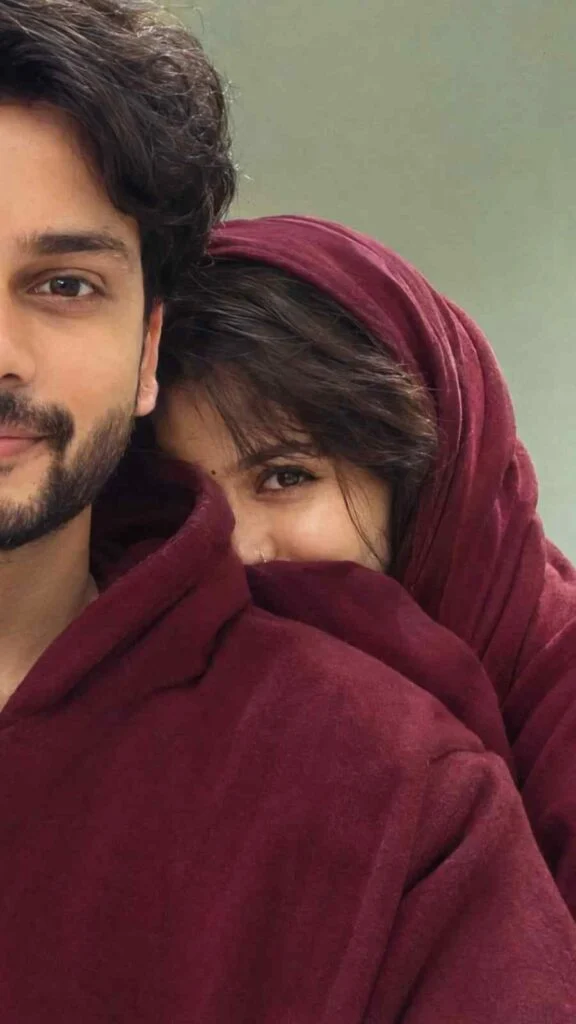
Ultra-realistic casual close-up couple selfie, only half of the young man’s face visible on the left side of the frame while the young woman hides shyly behind his shoulder, showing only half of her face including only one expressive eye.
Both wear oversized deep maroon hoodies.
The man has thick dark hair, strong eyebrows, smooth skin, and a calm expression.
The woman wears deep maroon jersey shawl on head hair with soft curtain bangs, natural long eyelashes, and a mysterious gaze. Minimal sage green indoor background, soft natural daylight, cozy intimate atmosphere, slightly overexposed highlights, candid phone camera shot, subtle blur, realistic skin texture, high detail, Instagram aesthetic, 35mm lens, shallow depth of field, 8K photorealistic.9:16
AI Image Prompt
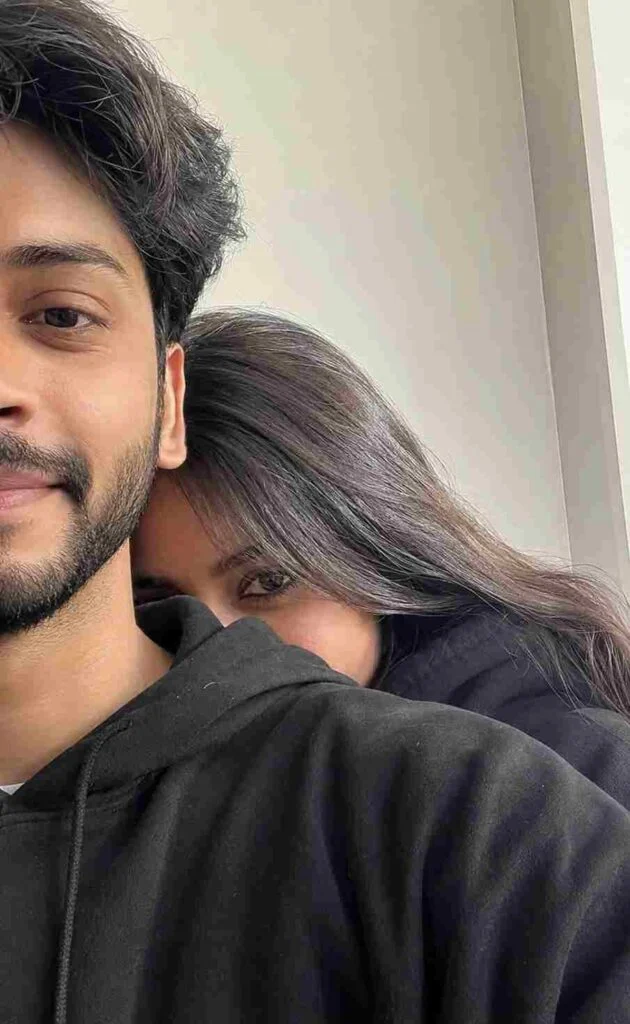
Ultra-realistic casual close-up couple selfie, only half of the young man’s face visible on the left side of the frame while the young woman hides shyly behind his shoulder, showing only one expressive eye. Both wear oversized black hoodies. The man has thick dark hair, strong eyebrows, smooth skin, and a calm expression. The woman has long silky dark brown hair with soft curtain bangs, natural long eyelashes, and a mysterious gaze. Minimal white indoor background, soft natural daylight, cozy intimate atmosphere, slightly overexposed highlights, candid phone camera shot, subtle blur, realistic skin texture, high detail, Instagram aesthetic, 35mm lens, shallow depth of field, 8k
How to Use Couple AI Photo Prompts
Using a couple of AI photo prompts is simple. Upload your couple photo to an AI image tool, copy your favourite prompt, and paste it with the image. Tell the AI to keep the original faces and identities unchanged, then generate the edited photo. You can also change the background, lighting, outfits, or mood to get your desired result.
You can follow the steps for creating images;
Choose a clear couple photo.
Upload the photo to your AI tool.
Copy and paste your favourite prompt.
Mention the style or background you want.
Generate the image and check the result.
Make small changes if anything looks unnatural.
Tips for Better Couple AI Photo Editing Results
To create realistic and attractive couple AI photos, use a clear reference image and give the AI simple, detailed instructions. Clearly mention which features should stay unchanged and describe the background, lighting, mood, and style you want.
Use a clear, high-quality photo.
Tell AI to keep both faces and identities unchanged.
Use specific prompts instead of short instructions.
Mention natural skin texture for realistic results.
Add cinematic or soft lighting for a better look.
Avoid making too many changes at once.
Check hands, faces, and body proportions after generation.
Best AI Tools for Couple Photo Editing
You can experiment with different AI tools depending on the type of result you want.
ChatGPT: Useful for prompt-based image creation and editing.
Midjourney: Popular for creative and cinematic image generation.
Leonardo AI; Offers detailed image generation and creative controls.
Adobe AI: Useful for AI-powered creative editing.
Google Gemini: Can be used for AI image-related tasks depending on available features.
Flux: Known for realistic AI image generation.
Ideogram: Useful for creative visual generation and designs.
For beginners, starting with one tool and learning how prompts work is better than trying every AI tool at the same time.
Common Problems When Creating Couple AI Photos
Faces may look different from the original.
Hands or fingers can look unnatural.
Skin may appear too smooth or artificial.
Clothes may change unexpectedly.
Backgrounds can look fake or unrealistic.
Facial expressions may change.
Body proportions may look incorrect.
Image quality can become blurry.
AI may add unwanted objects or details.
Lighting may look unnatural.
Final Thoughts
The Best Couple AI Photo Editing Prompts 2026 can help you turn ordinary couple pictures into romantic, cinematic, aesthetic, and professional-looking portraits.
The key is to use a clear reference image and a detailed prompt. Always tell the AI which parts of the original photo should stay unchanged, especially the couple’s faces and identities.
Start with one prompt, generate your image, and then make small adjustments until you get the style you want. With practice, you can create many different couple photo concepts using the same original picture.