Cinematic Gemini AI Video Prompts 2026 | Best Prompts
ByRutik Soni
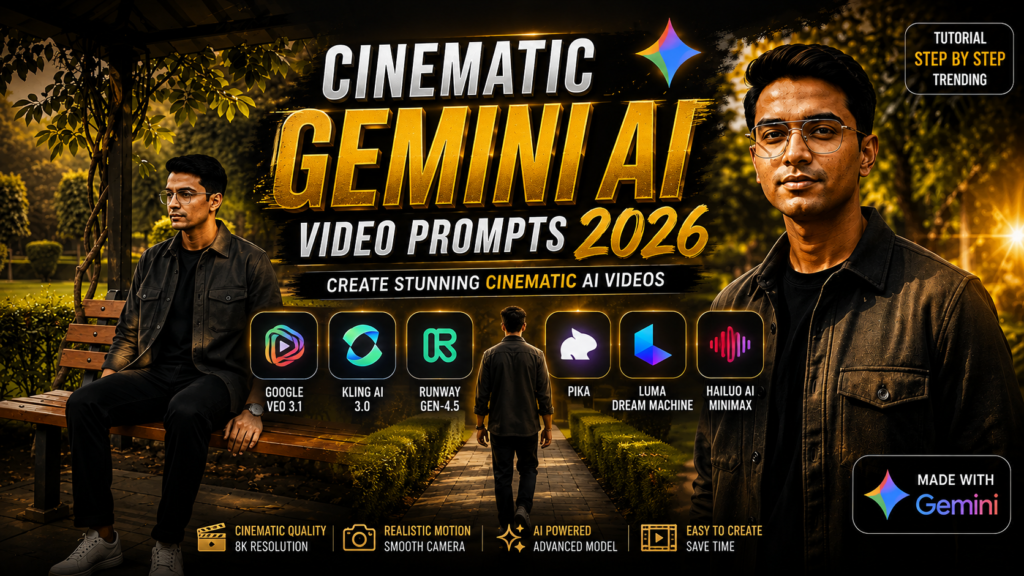
Imagine turning a simple idea into a cinematic AI video that looks like it belongs in a Hollywood movie—dramatic lighting, smooth camera movements, realistic environments, atmospheric effects, and breathtaking visuals, all created with the power of AI.
In 2026, AI video generation has become more creative than ever. With the right Gemini AI video prompt, you can transform ordinary concepts into visually stunning scenes with cinematic composition, realistic motion, emotional storytelling, and professional-looking details.
Whether you want to create cinematic travel scenes, luxury car videos, rainy atmosphere videos, fantasy worlds, action sequences, romantic scenes, nature visuals, or futuristic environments, a well-written prompt can make a huge difference.
In this guide, you’ll discover powerful Cinematic Gemini AI Video Prompts 2026 that you can customise for your own creative projects. With PromptSeen, you can create all types of video prompts and bring your creative ideas to life.
What Are Cinematic Gemini AI Video Prompts?
Cinematic Gemini AI video prompts are detailed instructions designed to describe how you want an AI-generated video to look and feel. Instead of simply writing something like “create a rainy city video”, you can describe the environment, camera movement, lighting, atmosphere, subject, visual style, and overall mood.
A detailed prompt gives the AI more creative direction and helps produce a video with a more polished cinematic appearance.
For example, you can specify:
Cinematic camera movement
Realistic lighting
Camera angle
Depth of field
Environmental details
Weather and atmosphere
Subject movement
Background elements
Color grading
Film-like composition
High-detail visuals
Why Are Cinematic AI Videos So Popular in 2026?
Cinematic AI videos are becoming popular because creators can experiment with professional-looking visuals without needing expensive cameras, large production teams, or complicated locations.
AI makes it possible to visualise ideas that would otherwise require a significant amount of time and money. A creator can start with a simple concept and turn it into an engaging visual sequence by carefully describing the desired scene.
These videos are particularly useful for YouTube Shorts, TikTok, Instagram Reels, advertisements, storytelling, concept videos, and creative projects.
Best Cinematic Gemini AI Video Prompts 2026
AI Image Prompt
MASTER VIDEO PROMPT — 7 SCENE CINEMATIC RECREATION
Create a photorealistic, ultra-realistic cinematic live-action video in vertical 9:16 format.
Use the uploaded user’s photo as the primary visual reference for the person.
IMPORTANT IDENTITY RULE:
The person must retain the SAME natural face, hairstyle, apparent age and natural body proportions from the uploaded photo throughout the entire video.
Do not copy the original person’s body from the reference video. Use the uploaded user’s own natural body proportions, height, build and appearance.
The reference video should control the scene progression, camera movement, location, composition and overall choreography.
OUTFIT:
Dress the uploaded person in a premium smart-casual outfit:
dark charcoal/olive premium overshirt, plain black T-shirt underneath, relaxed straight-fit dark trousers, clean white minimalist sneakers and a simple premium wristwatch.
Keep this exact outfit unchanged throughout all 7 scenes.
==================================================
SCENE 1 — OPENING WALK
==================================================
Start in the SAME garden/park location shown in the reference video.
The person naturally walks forward along the paved pathway.
Camera starts behind/three-quarter behind the person and smoothly follows him.
Keep the same landscaped garden environment:
trimmed green hedges, mature trees, green lawns and paved pathway.
Natural walking speed.
Natural arm swing and realistic foot placement.
The person’s own face, hairstyle and body proportions remain consistent with the uploaded photo.
==================================================
SCENE 2 — CENTRAL PATH CAMERA FOLLOW
==================================================
Continue directly from Scene 1 in the SAME location.
The person continues walking along the long central garden pathway.
The camera smoothly follows and gradually creates a wider cinematic composition.
Green hedges form natural leading lines on both sides.
Large trees and garden greenery remain visible.
Do not change the location.
Do not accelerate the walking.
Maintain natural real-life movement.
==================================================
SCENE 3 — COVERED BENCH AREA
==================================================
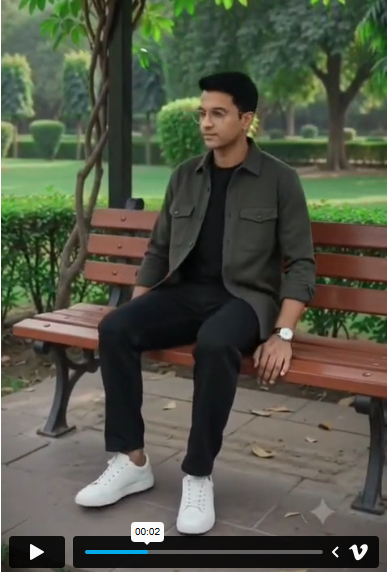
Continue naturally toward the SAME covered garden seating area shown in the reference.
The camera smoothly moves/pans toward the wooden/red-brown benches.
The person approaches the seating area and naturally sits on the bench.
Show realistic sitting movement:
natural bending of knees, natural body weight transfer and natural hand movement.
Keep the same outfit, hairstyle, face and body proportions.
The surrounding garden, trees, lawn and covered seating structure remain consistent.
==================================================
SCENE 4 — DECORATIVE BRIDGE
==================================================
Continue from the previous action into the SAME garden environment.
The person walks naturally across the decorative pedestrian bridge.
White patterned railings remain visible on both sides.
Green vegetation and mature trees surround the bridge.
Camera follows smoothly from behind/three-quarter rear angle.
Maintain normal walking speed.
No sudden location change.
==================================================
SCENE 5 — SIDE-PROFILE GARDEN WALK
==================================================
Continue seamlessly in the SAME exact garden location.
The person leaves the bridge and continues walking along the SAME landscaped pathway.
The camera smoothly moves from behind toward a natural side-profile view.
Show the person’s face clearly enough to maintain strong identity consistency with the uploaded photo.
Keep the SAME:
face shape,
eyes,
eyebrows,
nose,
lips,
jawline,
skin tone,
hairstyle,
apparent age,
body proportions
and overall appearance.
The person briefly looks naturally toward the garden while continuing to walk.
The same green hedges, mature trees, pathway and lawns remain visible.
Natural daylight and realistic shadows.
==================================================
SCENE 6 — CINEMATIC STOP + FACE SHOT
==================================================
Continue in the SAME garden location without changing the environment.
The person slowly stops beside the pathway.
The camera performs a smooth cinematic push-in from a medium shot toward a medium close-up.
The person naturally looks toward the camera with a calm, confident expression.
Keep the uploaded user’s face recognizable and consistent.
Do not make the face older.
Do not change facial proportions.
Do not beautify or reshape the face.
Keep realistic skin texture, natural pores and realistic facial detail.
The background remains the SAME garden, with green hedges, trees and pathway softly blurred through natural depth of field.
Keep the same premium outfit.
The camera movement must be slow, smooth and realistic.
==================================================
SCENE 7 — FINAL WIDE GARDEN REVEAL
==================================================
Continue directly from Scene 6 in the SAME exact location.
The person turns naturally and begins walking forward along the SAME pathway.
The camera slowly moves backward while keeping the person naturally centered.
Gradually widen the frame to reveal the SAME landscaped garden:
green hedges,
mature trees,
green lawns,
paved pathway
and surrounding garden environment.
The person walks at normal real-life speed.
Do not speed up the movement.
Finish with a beautiful wide cinematic composition showing the person naturally walking through the garden.
Keep the person’s face, hairstyle, body proportions and outfit consistent until the final frame.
==================================================
FACE CONSISTENCY LOCK
==================================================
The uploaded user’s photo is the primary identity reference.
Keep the SAME recognizable face throughout all 7 scenes.
Same facial structure.
Same eyes.
Same eyebrows.
Same nose.
Same lips.
Same jawline.
Same skin tone.
Same hairstyle.
Same apparent age.
No face morphing.
No identity drift.
No aging.
No younger/older appearance.
No facial reshaping.
No artificial beauty filter.
No plastic skin.
The person must look like the SAME real person from the first frame to the final frame.
==================================================
BODY CONSISTENCY
==================================================
Use the uploaded user’s own natural body proportions.
Do NOT copy the reference video’s original person’s body.
Maintain natural:
head-to-body ratio,
shoulder width,
torso size,
arm length,
leg length,
height and overall build.
Do not make the person oversized, unusually muscular, extremely wide or unusually tall.
The smart outfit must naturally fit the user’s own body.
==================================================
OUTFIT CONSISTENCY
==================================================
Dark charcoal/olive premium overshirt.
Plain black T-shirt.
Relaxed straight-fit dark trousers.
Clean white minimalist sneakers.
Simple premium wristwatch.
Exactly the same outfit in all 7 scenes.
No wardrobe change.
No color change.
No random accessories.
==================================================
CAMERA & REALISM
==================================================
Professional cinema-camera appearance.
Smooth realistic tracking.
Natural handheld micro-movement.
Natural lens perspective.
Natural depth of field.
Realistic focus transitions.
Realistic motion blur.
Smooth cinematic transitions.
No teleportation.
No sudden camera jumps.
No unnatural camera movement.
==================================================
COLOR & QUALITY
==================================================
Natural daylight.
Premium cinematic color grading.
Realistic green vegetation.
Natural skin tones.
Controlled highlights.
Balanced shadows.
Subtle cinematic contrast.
Natural atmospheric depth.
Subtle high-end film grain.
Ultra-realistic live-action appearance.
4K HD quality with 8K-level fine detail.
Realistic skin, hair, clothing, trees, grass, pathway, benches and bridge.
==================================================
MOTION RULE
==================================================
Do NOT make the video unnecessarily fast.
Walking must remain normal human walking speed.
Sitting must happen naturally.
Turning must happen naturally.
Camera movements must be smooth and controlled.
Do not compress multiple actions into one instant.
Do not skip the important movements between scenes.
The video should feel like genuine real-time footage filmed by a professional camera operator.
==================================================
STRICT NEGATIVE
==================================================
No face change.
No body change.
No hairstyle change.
No outfit change.
No aging.
No facial distortion.
No identity drift.
No oversized body.
No muscular transformation.
No extra fingers.
No extra limbs.
No distorted hands.
No floating feet.
No sliding feet.
No robotic movement.
No warped background.
No changing garden.
No new location.
No random people.
No cartoon.
No anime.
No 3D.
No CGI appearance.
No plastic skin.
No excessive beauty filter.
No oversaturated colors.
No excessive HDR.
FINAL RESULT:
Create one coherent, photorealistic cinematic sequence containing exactly 7 main scenes.
Scenes 1–4 must follow the original reference sequence.
Scenes 5–7 are additional cinematic moments that continue naturally in the SAME garden/location.
The final result must look like the SAME uploaded person was genuinely filmed in the SAME garden from beginning to end, with the user’s own face, hairstyle and natural body proportions, consistent premium outfit, realistic movement, realistic camera work and cinematic 4K/8K-level quality.
How to Write Better Gemini AI Video Prompts
A strong cinematic prompt should describe what the viewer sees, how the camera moves, how the environment behaves, and what mood the scene should create.
A useful structure is:
Subject + Environment + Camera + Lighting + Movement + Atmosphere + Visual Style
For example:
Subject: Luxury sports car Environment: Rainy city street at night Camera: Low-angle tracking shot Lighting: Neon reflections and soft streetlights Movement: Smooth driving motion and falling rain Atmosphere: Moody and dramatic Style: Photorealistic cinematic commercial
Lighting plays a major role in the overall appearance of a video. You can mention:
Golden-hour lighting
Soft cinematic lighting
Volumetric lighting
Low-key lighting
Moonlight
Warm sunset lighting
Keep Movement Natural
For realistic results, describe natural movement rather than adding too many actions at once. Smooth camera motion and consistent subject movement can help maintain a professional cinematic feeling.
Common Mistakes to Avoid
Using extremely short prompts with little visual information
Adding too many unrelated subjects
Forgetting to describe camera movement
Not specifying the desired mood
Overloading one scene with excessive actions
Changing the subject or environment repeatedly
Using vague descriptions such as “make it amazing”
Instead, clearly describe the subject, environment, camera, lighting, movement, and atmosphere.
Final Thoughts
Cinematic AI video creation is becoming an exciting way for creators to turn imagination into visual content. The biggest difference between an ordinary result and a cinematic result often comes down to how clearly the scene is described.
The prompts above can be used as starting points for creating rainy city scenes, luxury car commercials, nature videos, futuristic worlds, emotional stories, action sequences, and many other cinematic concepts.
Experiment with different camera movements, lighting styles, environments, and moods to develop your own unique visual style. With creative prompts and consistent experimentation, you can turn simple ideas into eye-catching cinematic AI videos in 2026.