Aesthetic Nature Vibes AI Photo Editing Prompt 2026
ByRutik Soni
Imagine turning a simple photo into a peaceful, dreamy nature scene with soft sunlight, lush green landscapes, beautiful colours, and a cinematic look—without a professional camera or hours of editing.
With the right AI photo editing prompt, you can transform your ordinary picture into an aesthetic nature portrait in just a few clicks. Whether you want a calm Instagram post, a Pinterest-worthy photo, or a beautiful profile picture, this prompt can give your image a fresh and natural vibe.
In this guide, you’ll learn how to use the Aesthetic Nature Vibes AI Photo Editing Prompt 2026, which is an AI tool you can try, and some simple tips to get better results.
What Is an Aesthetic Nature Vibes AI Photo Editing Prompt?
An Aesthetic Nature Vibes AI Photo Editing Prompt is a set of instructions that tells an AI image editor how you want your photo to look.
Instead of manually changing the background, lighting, colors, and atmosphere, you can describe the complete look in the prompt. The AI then uses those instructions to create a more polished and artistic image.
For example, you can ask the AI to add:
Lush green trees and plants
Soft golden sunlight
Natural outdoor surroundings
A dreamy atmosphere
Cinematic lighting
Warm and realistic colours
A soft background blur
Ultra-realistic details
Why Are Nature-Style AI Photos Trending?
Nature-based photos have a calm and attractive appearance. Green landscapes, soft sunlight, flowers, mountains, and outdoor scenes can make ordinary portraits look much more interesting.
AI makes this process easier because you don’t need to travel to a forest, mountain, or garden just to create a particular photo.
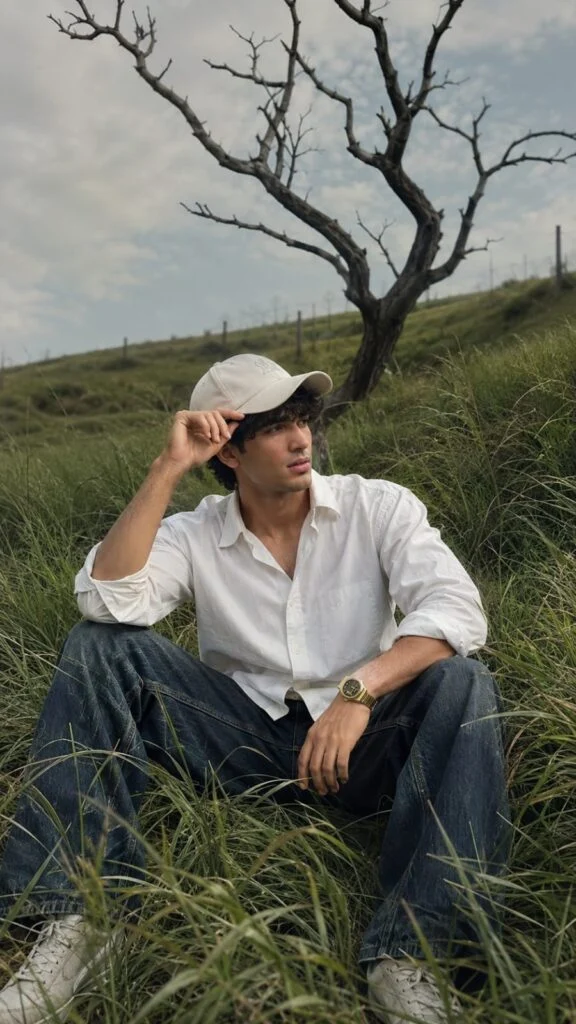
Photorealistic Nature Fashion Portrait Prompt A photorealistic cinematic vertical portrait of a stylish young man sitting casually in the middle of a lush, overgrown green grass field on a gentle hillside. He is surrounded by tall, flowing wild grass that creates a natural layered foreground and immersive countryside atmosphere. The young man is wearing a crisp oversized white button-up shirt with the sleeves casually rolled up, relaxed dark blue loose-fit jeans, clean light-colored sneakers, and a simple white baseball cap. He wears a stylish wristwatch on one wrist. His pose is relaxed and natural, sitting with his legs apart, one hand resting near his knee while the other hand lightly holds the brim of his cap. His head is turned sideways, looking away from the camera with a calm, thoughtful expression. In the background stands a dramatic large leafless tree with twisting dark branches, creating a striking contrast against the soft pale cloudy sky. The rolling green landscape, wild grass, and solitary tree create a peaceful, cinematic, slightly melancholic mood. Soft natural daylight, muted warm tones, realistic shadows, gentle atmospheric haze, detailed grass texture moving naturally in the breeze, realistic fabric folds, natural skin texture, shallow depth of field, DSLR photography, cinematic color grading, premium editorial photography, ultra-realistic, highly detailed, natural human proportions, vertical composition, 9:16 aspect ratio. Use the uploaded reference face as the highest priority. Preserve 100% facial identity accuracy. Keep the exact face shape, jawline, eyes, eyebrows, nose, lips, skin texture, torehead, hairline, and natural proportions unchanged. Do not beautify, stylize, modify, or reinterpret facial features. Maintain the same age, expression, and ethnicity as the reference image. Ensure the face is instantly recognizable as the same person in real life. Ultra-realistic photography, natural skin details, authentic facial structure, no face swapping artifacts, no Al-generated facial alterations, no exaggerated features, no symmetry correction, no cosmetic enhancements. Size 9 :16 .
AI Image Prompt
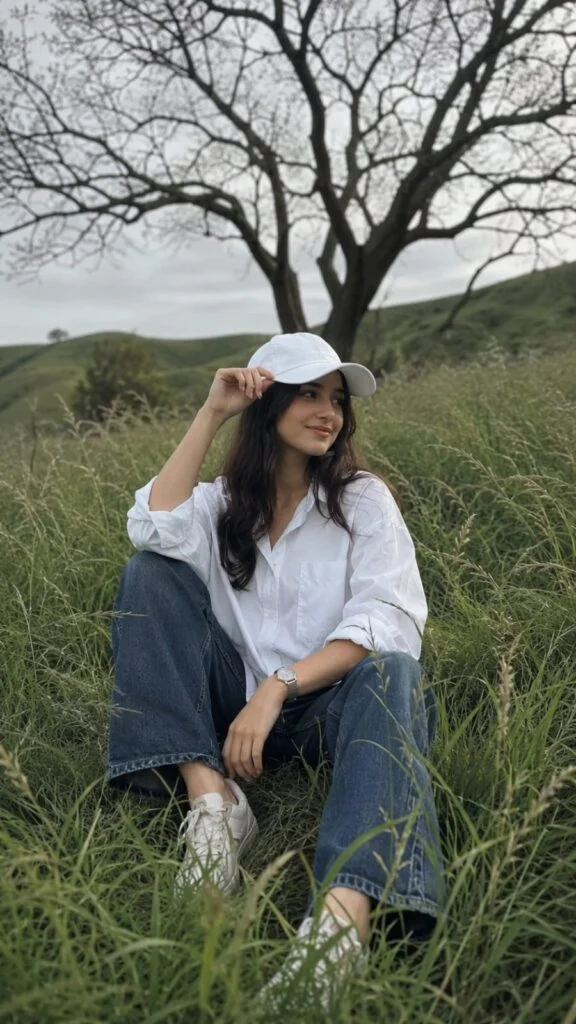
Photorealistic Nature Fashion Portrait Prompt A photorealistic cinematic vertical portrait of a stylish young woman sitting casually in the middle of a lush, overgrown green grass field on a gentle hillside. He is surrounded by tall, flowing wild grass that creates a natural layered foreground and immersive countryside atmosphere. The young woman is wearing a crisp oversized white button-up shirt with the sleeves casually rolled up, relaxed dark blue loose-fit jeans, clean light-colored sneakers, and a simple white baseball cap. He wears a stylish wristwatch on one wrist. His pose is relaxed and natural, sitting with his legs apart, one hand resting near his knee while the other hand lightly holds the brim of his cap. His head is turned sideways, looking away from the camera with a calm, thoughtful expression. In the background stands a dramatic large leafless tree with twisting dark branches, creating a striking contrast against the soft pale cloudy sky. The rolling green landscape, wild grass, and solitary tree create a peaceful, cinematic, slightly melancholic mood. Soft natural daylight, muted warm tones, realistic shadows, gentle atmospheric haze, detailed grass texture moving naturally in the breeze, realistic fabric folds, natural skin texture, shallow depth of field, DSLR photography, cinematic color grading, premium editorial photography, ultra-realistic, highly detailed, natural human proportions, vertical composition, 9:16 aspect ratio. Use the uploaded reference face as the highest priority. Preserve 100% facial identity accuracy. Keep the exact face shape, jawline, eyes, eyebrows, nose, lips, skin texture, torehead, hairline, and natural proportions unchanged. Do not beautify, stylize, modify, or reinterpret facial features. Maintain the same age, expression, and ethnicity as the reference image. Ensure the face is instantly recognizable as the same person in real life. Ultra-realistic photography, natural skin details, authentic facial structure, no face swapping artifacts, no Al-generated facial alterations, no exaggerated features, no symmetry correction, no cosmetic enhancements. Soze 9 : 16
How to Use the Aesthetic Nature AI Prompt
Choose a clear, high-quality photo with your face visible.
Open an AI photo editing tool that supports image uploads.
Upload your original photo.
Copy the Aesthetic Nature AI Prompt.
Paste the prompt into the AI editor.
Tell the AI to keep your face, skin tone, hairstyle, and identity natural.
Generate the edited image.
If the result is not perfect, adjust the prompt and try again.
Download or save your favourite result.
Share your aesthetic nature photo on Instagram, Pinterest, Facebook, or WhatsApp.
How to Make Your AI Nature Photos More Realistic
Sometimes AI-generated images can look overly edited. You can avoid this by keeping your instructions simple and realistic.
Use words such as:
Natural lighting
Realistic skin texture
Authentic environment
Subtle colours
Natural shadows
Realistic depth of field
Ultra-realistic details
Professional photography
Avoid adding too many complicated effects at once. A clean prompt often produces a more natural result.
Best AI Tools for Photo Editing
ChatGPT – Upload your photo and describe the nature style you want.
Google Gemini – Useful for AI image editing and creative photo transformations.
Leonardo AI – Good for detailed and artistic nature scenes.
Adobe Firefly – Helpful for realistic background and lighting changes.
Midjourney – Great for creative and cinematic visual styles.
Flux AI – Useful for highly realistic AI-generated images.
Common Problems and Solutions
Problem
Solution
The face looks different.
Add “keep my face and facial features unchanged” to the prompt.
The image looks fake.
Use words like “photorealistic”, “natural lighting”, and “realistic skin texture”.
The background is too strong
Ask for a soft, subtle, natural background.
Skin looks overly smooth.
Add “natural skin texture and realistic details”.
Lighting looks unnatural.
Specify soft natural sunlight or golden-hour lighting.
The image is blurry.
Upload a high-quality original photo and request sharp, high-detail results.
Clothes change.
Add “keep the original clothing unchanged.”
AI adds unwanted objects.
Clearly tell the AI to remove unwanted objects and keep the scene clean.
Tips for Better AI Photo Editing Results
Follow these simple tips for better results:
Use a high-quality original photo for better facial details.
Give clear instructions instead of using a very confusing prompt.
Mention lighting if you want a specific mood.
Tell the AI to preserve your face when editing a personal photo.
Try different backgrounds such as forests, mountains, gardens, and lakes.
Generate multiple versions and choose the most natural one.
Avoid excessive effects if you want a realistic photography style.
Final Thoughts
The Aesthetic Nature Vibes AI Photo Editing Prompt 2026 is an easy way to give your ordinary photos a fresh, peaceful, and cinematic appearance. With simple instructions, you can add beautiful natural surroundings, soft sunlight, realistic colours, and a dreamy atmosphere to your pictures.
The key is to use a clear photo, write specific instructions, and keep the final result natural. Try different backgrounds and lighting styles until you find the look that matches your personality.
With AI photo editing, you don’t need expensive equipment or professional editing skills to create stunning nature-inspired photos.