Cinematic Mughal Majesty 8K AI Video Prompt 2026

The Cinematic Mughal Majesty 8K AI Video Prompt 2026 is a creative way to transform a simple photo or idea into a royal Mughal-era cinematic video. With AI video tools, you can create grand palaces, royal outfits, dramatic lighting, traditional architecture, and majestic camera movements without needing professional filming equipment.

This style is perfect for creators who want to make historical, royal, cinematic, and luxury-themed AI videos for social media, YouTube, TikTok, Instagram Reels, or personal projects.

With PromptSeen, you can discover creative AI prompts and get fresh ideas for your next photo and video editing projects.

What Is a Cinematic Mughal Majesty AI Video?

A Cinematic Mughal Majesty video combines the visual beauty of the Mughal era with modern cinematic effects. The main focus is usually a royal character wearing traditional clothing and standing inside a magnificent palace, royal courtyard, garden, or historical setting.

AI can add details such as:

  • Royal Mughal clothing
  • Intricate palace architecture
  • Marble floors and grand pillars
  • Traditional jewelry and accessories
  • Royal gardens and fountains
  • Warm golden lighting
  • Cinematic camera movement
  • Realistic facial details
  • Dramatic shadows
  • Rich historical atmosphere
  • 8K-style visual quality

The result can look like a scene from a historical movie.

Best Cinematic Mughal Majesty 8K AI Video Prompt
AI Image Prompt
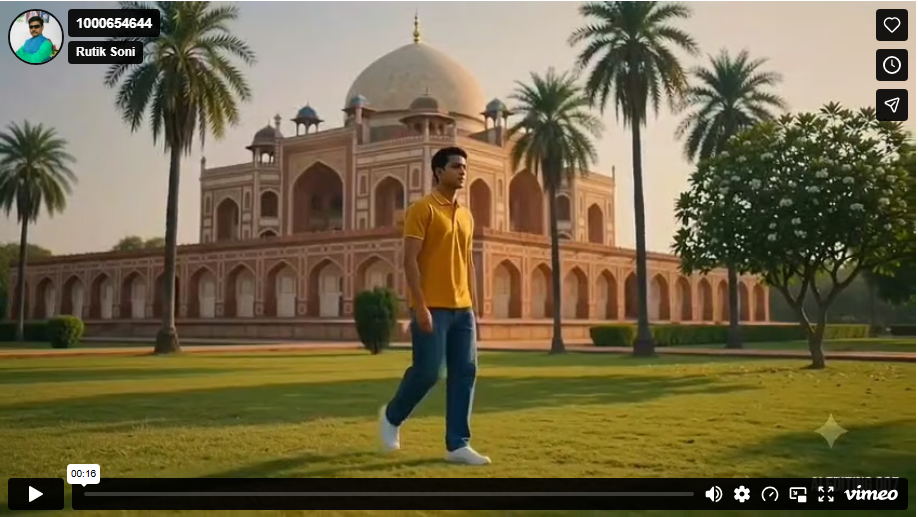
“A cinematic ultra-realistic 8K video (16:9) of a young man wearing a baggy relaxed-fit denim jeans and a stylish premium fitted shirt, walking and moving around a grand Mughal-era red-sandstone domed mausoleum with palm trees, golden-hour to bright daylight lighting. CRITICAL: use the uploaded reference photo as the exact identity source — same face, same facial features, same exact skin tone and skin texture as the person in the uploaded photo, same body, maintained precisely in every scene, zero identity variation or face change between scenes. This must work accurately for any person of any age or skin tone who uploads their own reference photo — the generated face and skin must always match the uploaded photo exactly, never a generic or different face. Scene 1: Wide shot — he walks steadily across an open green lawn in front of the grand domed monument, tall palm trees and a flowering tree nearby, warm golden sunlight casting long shadows, natural confident walking pace. Scene 2: Wide tracking shot from behind — he walks forward between tall palm trees toward the monument, warm golden-hour sunlight glowing behind the dome, white flower petals scattered on the grass, cinematic depth. Scene 3: He walks toward a stone bench under a large shady tree, then sits down gracefully, resting one arm on his knee while gazing at the monument in the distance, dappled sunlight through the leaves, calm cinematic pause with natural sitting motion. Scene 4: He walks through a stone arched corridor lined with pillars, warm sunlight and shadows streaking across the floor, greenery visible through the far archway, steady cinematic walking motion from behind. Scene 5: Low-angle shot — he climbs a set of old stone steps toward a red-sandstone archway entrance, bright blue sky above, dramatic upward framing, purposeful climbing motion. Scene 6: Wide shot — he walks briskly back across the open lawn with the full monument and palm trees behind him, bright blue sky, crisp natural daylight, energetic confident walking pace. Scene 7: Final low-angle shot — he walks along a stone parapet wall with the monument’s domed chhatri (pavilion) towering behind him against a clear blue sky, steady forward walking motion, cinematic slow zoom-out to finish. Overall style: same face, same identity, same exact skin tone, same body, same baggy jeans and premium shirt outfit consistent in every scene, no identity change, same real Mughal-era monument location throughout — domed mausoleum, palm-lined lawn, shaded bench, arched stone corridor, stone steps, and parapet wall — natural continuous walking and movement in every single scene, realistic skin and fabric texture, warm golden-to-bright cinematic color grading, natural sunlight with soft lens flares, filmic contrast and depth, smooth cinematic transitions between angles, ultra-realistic premium 8K quality, 16:9 widescreen format, continuous story flow from start to end, no scene skipped.”

How to Create a Mughal Majesty AI Video

Creating this type of video is simple if you follow the right process. You do not need advanced video-editing skills.

1. Choose Your Photo or Character

Start with a clear, high-quality image. If you are using your own photo, choose an image where the face is clearly visible.

A front-facing or slightly angled portrait usually works well because AI can understand the character more easily. Also try: Cinematic Candlelight Girl AI Photo Editing Prompt 2026

2. Add the Mughal Royal Style

Use an AI image generator or photo editor to create the Mughal appearance. You can describe the clothing, palace, jewelry, lighting, and environment in your prompt.

For example, you can request:

  • Royal sherwani
  • Traditional Mughal dress
  • Embroidered royal fabric
  • Pearl and gold jewelry
  • Mughal palace background
  • Royal garden setting

3. Convert the Image Into a Video

Once your image is ready, upload it to an AI video generator that supports image-to-video generation.

Add instructions for movement instead of asking the AI to completely change the character.

For example:

Slow camera push-in, gentle movement of the royal clothing, subtle hair movement, natural blinking, soft background motion, cinematic depth of field, realistic lighting.

This helps create a more natural video.

How to Make the Video More Realistic

If you want a realistic result, focus on natural movement.

Instead of asking the AI to make the character perform complicated actions, start with simple movements such as:

  • Natural blinking
  • Slight head movement
  • Gentle breathing
  • Moving fabric
  • Subtle hair movement
  • Slow camera movement
  • Background fountain movement
  • Soft sunlight changes

These small movements can make the final video feel more believable.

Common Problems and Their Solutions

AI-generated historical videos can sometimes have visual problems.

Common ProblemSimple Solution
Face ChangesUse a clear reference image.
Unnatural HandsKeep hand movements simple.
Modern ObjectsMention “Mughal-era setting.”
Strange ClothingAdd realistic fabric movement.
Excessive Camera MovementUse slow cinematic movements.
Blurry DetailsUse a high-quality image.
Unnatural ExpressionsRequest natural facial expressions.

Tips for Better 8K AI Video Results

Follow these tips to improve your final video:

  • Start with a high-resolution reference image.
  • Keep the character’s face clearly visible.
  • Describe the historical environment in detail.
  • Use slow and natural camera movements.
  • Add realistic fabric and hair movement.
  • Use cinematic lighting instead of flat lighting.
  • Avoid too many actions in one prompt.
  • Mention photorealistic details when appropriate.
  • Keep the character consistent throughout the video.
  • Generate several versions and choose the most natural result.

Best AI Tools for Creating Mughal Cinematic Videos

You can experiment with different AI tools depending on the type of video you want to create. Popular options include

  • ChatGPT
  • Google Gemini
  • Midjourney
  • Leonardo AI
  • Kling AI, Runway
  • Veo
  • Hailuo AI

You can use an image-generation tool to create the initial Mughal scene and then use an image-to-video tool to add motion.

Conclusion

The Cinematic Mughal Majesty 8K AI Video Prompt 2026 can help you create impressive historical-style videos with AI. By combining royal clothing, Mughal architecture, cinematic lighting, realistic movements, and smooth camera techniques, you can create visuals that feel like scenes from a big historical movie.

The key is to keep the input detailed but focused. Start with a strong reference image, use simple movements, and experiment with different camera angles and lighting styles. With a few generations, you can create a unique Mughal-inspired cinematic AI video suitable for social media, creative projects, and visual storytelling.
Similar Posts