Romantic Beach Boy AI Photo Prompt 2026 | ChatGPT Prompt

Imagine standing on a peaceful beach with the sound of waves around you, soft sunlight falling on your face, and a cool sea breeze moving through your hair. Now imagine turning an ordinary photo into a romantic beach scene without changing your face or making the picture look fake.

That is what a good Romantic Beach Boy AI Photo Prompt can help you create. You can use ChatGPT with an image editing tool to give your photo a fresh beach look, better lighting, stylish clothes, and a romantic atmosphere. The best part is that you do not need professional photography skills to get started.

What Is a Romantic Beach Boy AI Photo Prompt?

A Romantic Beach Boy AI Photo Prompt is a written description that tells an AI photo editing tool how you want your picture to look.

Instead of giving random instructions, you describe important details such as:

  • Beach background
  • Outfit and hairstyle
  • Facial expression
  • Body position
  • Sunlight and shadows
  • Camera angle
  • Overall mood
  • Photo quality

Best Romantic Beach Boy ChatGPT Prompt
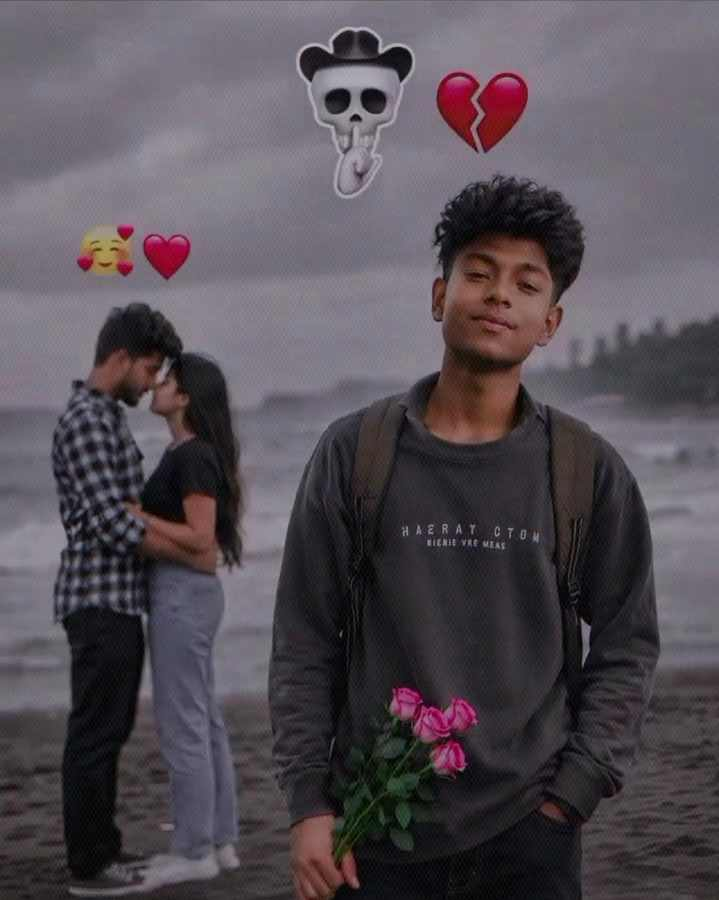
AI Image Prompt
Ultra-realistic DSLR portrait of a young South Asian boy standing on a dark sandy beach, holding a bouquet of pink roses, wearing a black sweatshirt and backpack, curly black hair, confident soft smile, dramatic cloudy sky and ocean waves, blurred couple kissing in the background, broken-heart and love emojis above, cinematic moody lighting, shallow depth of field, photorealistic, 8K, natural skin texture, sharp focus, vertical composition..

How to Use the Romantic Beach Prompt

  • Choose a clear, high-quality photo where your face is visible.
  • Upload the photo to ChatGPT or your preferred editing tool.
  • Copy and paste the Romantic Beach Boy prompt.
  • Mention your preferred outfit, pose, beach, or sunset style.
  • Generate the image and check the final result.
  • If needed, ask for small changes to make it more natural.
  • Save the final image and use it on Instagram, TikTok, or other social platforms.

Why Use a Romantic Beach Boy Prompt?

A romantic beach prompt makes it easier to turn a simple portrait into a stylish beach photo without spending time planning a photoshoot. You can change the background, outfit, lighting, and pose while keeping the overall look natural. Also read Radha Rani AI Photo Editing Prompts and also try the trending template Main Keh Doon Sabhi Ko VN Video Template

Here are some reasons to try it:

  • Creates a fresh beach look
  • Saves time
  • Easy to customize
  • Great for social media
  • Works with different styles
  • Keeps your original appearance

Best AI Tools You Can Use

You can use different AI image editing tools with this prompt, depending on the type of result you want.

  • ChatGPT
  • Google Gemini
  • Leonardo AI
  • Midjourney
  • Adobe Firefly
  • Flux AI

Common Issues With This Prompt

  • Don’t use a blurry or low-quality photo.
  • Avoid giving too many instructions in one prompt.
  • Don’t change too many facial features if you want a natural look.
  • Avoid unrealistic poses or body proportions.
  • Don’t overuse filters, blur, or lighting effects.
  • Make sure the outfit matches the beach setting.
  • If the result looks odd, simplify the prompt and try again.

Conclusion

A good Romantic Beach Boy AI Photo Prompt 2026 can turn a simple portrait into a beautiful beach-style photograph with only a few instructions. You can experiment with different outfits, poses, backgrounds, and lighting until you find a look that feels right.

The key is to keep this prompt clear, natural, and specific. Start with the ready-made prompt above, then make small changes according to your style. With a good source photo and the right instructions, you can create an eye-catching romantic beach portrait without needing professional photography equipment.
Frequently Asked Questions

A Romantic Beach Boy AI Photo Prompt is a ready-made instruction that helps turn your normal photo into a realistic beach-style portrait with romantic lighting, a beautiful background, and a stylish look.

Upload your photo to ChatGPT or a suitable image editing tool, paste the prompt, and add your preferred outfit, pose, or beach background. Then generate the image and make small changes if needed.

Yes, you can easily change the outfit by mentioning the style you want, such as a white linen shirt, a black shirt, a casual T-shirt, or beachwear.

Similar Posts