Viral AI Little Baby Comedy Video Prompt 2026
AI-generated baby comedy videos are becoming a fun, viral trend on social media. These videos can turn a simple baby photo or idea into a funny, expressive, and entertaining short video using AI tools.
In this guide, we will show you how to create a viral AI little baby comedy video step by step. You will learn how to prepare your image, write a funny AI prompt, generate the video, add voice and sound effects, and make the final video ready for TikTok, YouTube Shorts, Instagram Reels, or Facebook.
With PromptSeen, you can also explore creative AI prompts and use them as inspiration for your next photo and video projects.
What Is an AI Little Baby Comedy Video?
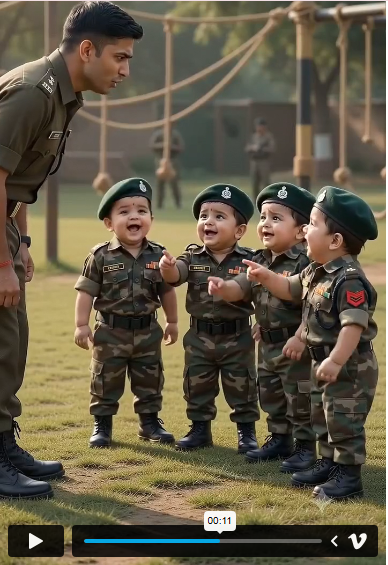
An AI little baby comedy video is a short AI-generated video that features a cute baby character in a funny situation. The baby can appear to talk, react, dance, make funny expressions, or perform a humorous action.
For example, you can create a scene where a cute baby acts like a serious office worker, complains about homework, gives a funny interview, or reacts dramatically to a simple situation.
The combination of cute baby visuals + funny dialogue + realistic expressions + trending audio makes this type of content highly engaging. Also try: Raksha Bandhan AI Photo Editing Prompts 2026
Why Are AI Baby Comedy Videos Trending?
AI baby comedy videos are popular because they are short, entertaining, and easy to understand. Viewers do not need a long story to enjoy them.
Some common reasons for their popularity include:
Viral AI Little Baby Comedy Video Prompt
Tools You Can Use to Create AI Baby Videos
You can use different AI tools depending on the type of video you want to create.
ChatGPT
ChatGPT can help you create funny ideas, dialogues, scripts, and detailed AI video prompts.
For example, you can ask ChatGPT to create a short comedy scene featuring a baby talking to his mother.
AI Image Generator
First, you need a suitable baby image. You can use an AI image generator to create a realistic or cartoon-style baby character.
AI Video Generator
An AI video generator can animate the image and turn it into a moving video. You can describe the baby’s movements, facial expressions, camera angle, and environment in your prompt.
CapCut
CapCut can be used for final editing. You can add subtitles, background music, sound effects, transitions, and other effects before publishing your video.
How to Create a Viral AI Little Baby Comedy Video
Follow these simple steps to create your own AI baby comedy video.
Tips to Make Your AI Baby Video More Viral
Creating the video is only the first step. You also need to make it interesting enough for people to watch and share.
Start With a Strong Hook
The first few seconds are important. Start with an unusual expression, funny dialogue, or surprising situation.
Keep It Short
Try to remove unnecessary scenes. A short video with a clear joke can perform better than a long video with too much information.
Use Captions
Many people watch social media videos without sound. Add clear captions so viewers can understand the dialogue.
Use Natural Expressions
The baby’s facial expressions should match the dialogue. If the baby is angry, surprised, confused, or happy, make sure the animation shows that emotion.
Create Different Versions
Do not stop after making one video. Try different jokes, characters, locations, and situations.
Common Problems When Creating AI Baby Videos
You may face a few problems while generating AI videos.
Final Thoughts
Creating a Viral AI Little Baby Comedy Video can be easy and fun when you follow the right steps. Start with a simple and funny idea, create a cute baby image, and use a detailed AI video prompt to bring the character to life. Adding funny dialogue, natural expressions, AI voice, captions, and sound effects can make the video more engaging and entertaining.
The key is to keep experimenting with different comedy ideas, characters, and situations. Keep your videos short, use a strong hook at the beginning, and make sure the story is easy to understand. With practice and creative prompts, you can create unique AI baby comedy videos that are perfect for short-form content platforms.