Raksha Bandhan is a beautiful festival that celebrates the special bond between brothers and sisters. In 2026, AI photo editing makes it easier to turn your Raksha Bandhan memories into creative, emotional, and festive pictures.
With the right AI prompt, you can transform a simple family photo into a cinematic Raksha Bandhan portrait while keeping the original faces and identities natural.
In this article, we have shared the best Raksha Bandhan AI Photo Editing Prompts for 2026, along with easy tips for creating realistic and attractive festival photos using AI tools such as ChatGPT, Gemini, Midjourney, Leonardo AI, and other AI photo editors.
What Are Raksha Bandhan AI Photo Editing Prompts?
Raksha Bandhan AI photo editing prompts are text instructions that tell an AI image editor how you want your photo to look. You can describe the clothes, background, lighting, pose, decorations, colors, and overall mood.
For example, you can upload a brother-sister photo and use a prompt asking the AI to add traditional Indian outfits, Raksha Bandhan decorations, warm lighting, flowers, and a festive background.
Why Are Raksha Bandhan AI Photos Trending in 2026?
AI-generated festival photos are becoming popular because they allow people to create unique images without needing a professional photoshoot.
Some popular reasons include:
Easy to create from a single photo
No expensive photography setup required
Creates traditional and cinematic looks
Perfect for Instagram, Facebook, and WhatsApp
Helps make old family photos look more creative
Allows you to try different outfits and backgrounds
Great for Raksha Bandhan wishes and social media posts
Best Raksha Bandhan AI Photo Editing Prompt
AI Image Prompt
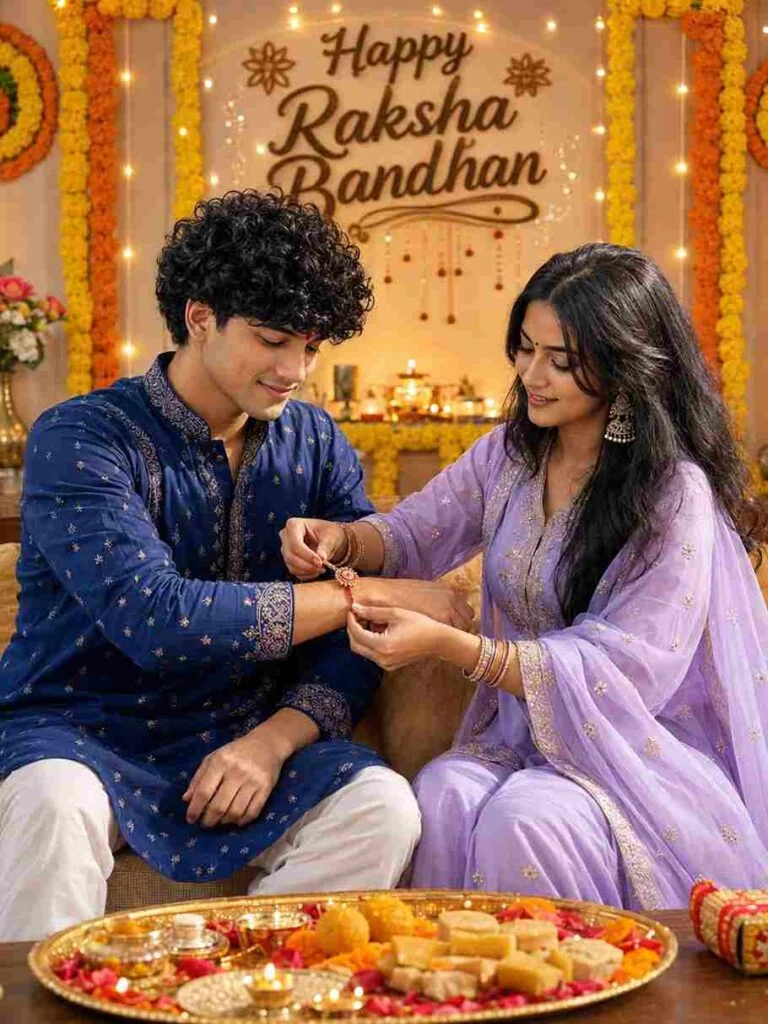
Ultra-realistic cinematic Indian Raksha Bandhan celebration photo of a young Indian brother and sister sitting together at home. Use the uploaded reference images for both people and preserve both faces exactly with strict identity lock. Do not alter facial identity, facial features, face shape, hairstyle, skin tone, age, body proportions, or natural appearance.
The brother is wearing an elegant deep royal blue embroidered kurta with white pajama, slightly curly textured black hair, neatly groomed beard, and a small red tilak on his forehead. The sister is wearing a beautiful pastel lavender traditional salwar suit with delicate golden embroidery, matching sheer dupatta, traditional jhumka earrings, bangles, and a small red bindi.
Show the sister lovingly tying a decorative red-and-gold Rakhi on her brother’s wrist while both look down at the Rakhi with warm, genuine smiles and a natural sibling bond. Keep the pose realistic and emotionally natural.
Place a traditional puja thali in the foreground on a wooden table, filled with Indian sweets, diya lamps, flowers, rice, roli, and Raksha Bandhan items.
Decorate the background with beautiful orange and yellow marigold flower garlands, warm fairy lights, glowing diyas, festive Indian decorations, and an elegant wall decoration displaying the text “Happy Raksha Bandhan”.
Create a cozy, premium Indian festive-home atmosphere with warm golden cinematic lighting, soft natural shadows, realistic skin texture, authentic facial expressions, detailed traditional clothing, subtle lens flare, beautiful background bokeh, shallow depth of field, DSLR photography, 85mm lens, f/1.8, high dynamic range, photorealistic, ultra-detailed, natural colors, realistic hands and fingers, professional photography, 8K quality.
Composition: vertical 9:16 portrait, full upper-body-to-knee framing, both siblings clearly visible, balanced composition, festive background fully visible, cinematic depth, highly realistic.
Important: Keep the uploaded faces exactly the same. Change only the outfits to deep royal blue for the brother and pastel lavender for the sister. Do not change anything else.
AI Image Prompt
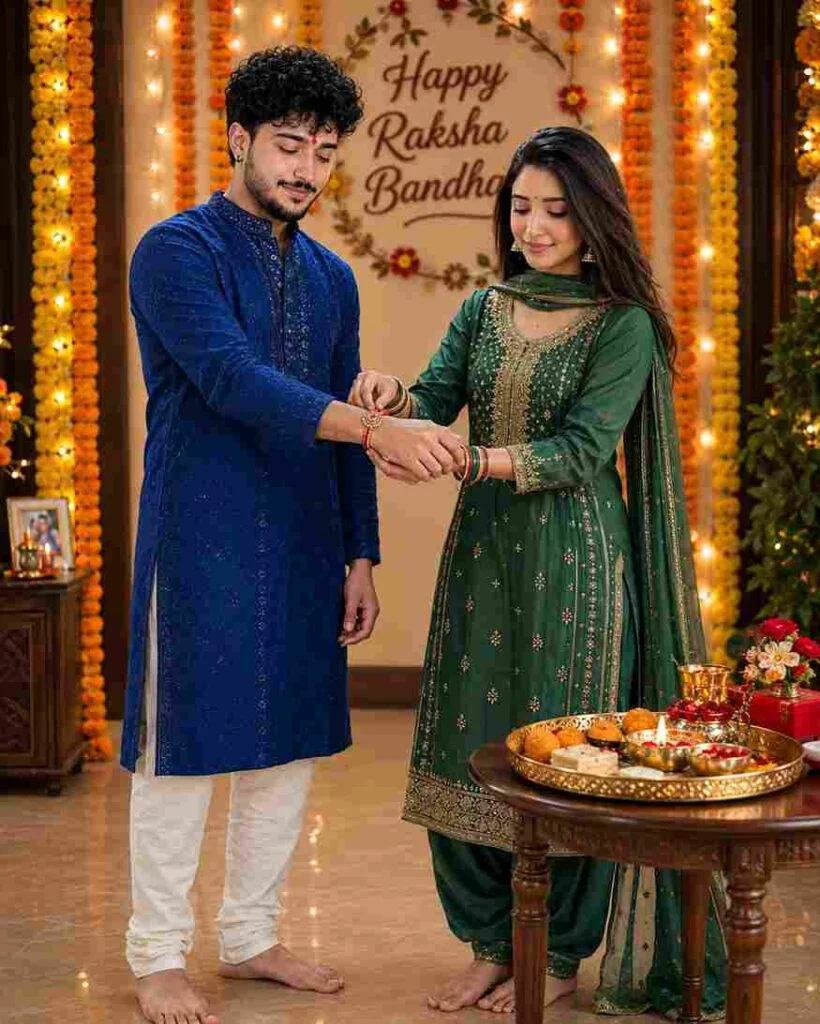
Create an ultra-realistic cinematic vertical 9:16 Raksha Bandhan photo using the two uploaded references. First image = sister, second image = brother. Strict identity lock: preserve both faces, facial features, skin tone, hair, age, and natural appearance exactly; change only pose, clothing, and environment.
Show them standing together at home, with the sister tying a red-and-gold Rakhi on her brother’s wrist as both look down with warm smiles. Brother: deep royal blue embroidered kurta, white pajama, curly black hair, groomed beard, red tilak. Sister: deep emerald green salwar suit with golden embroidery, matching dupatta, jhumkas, bangles, red bindi.
Add a festive puja thali with sweets, diya, and flowers, marigold garlands, fairy lights, and a wall decoration reading “Happy Raksha Bandhan.” Warm golden lighting, cinematic bokeh, realistic hands, natural expressions, DSLR 85mm, f/1.8, HDR, photorealistic, ultra-detailed, 8K, full-body/three-quarter composition.
AI Image Prompt
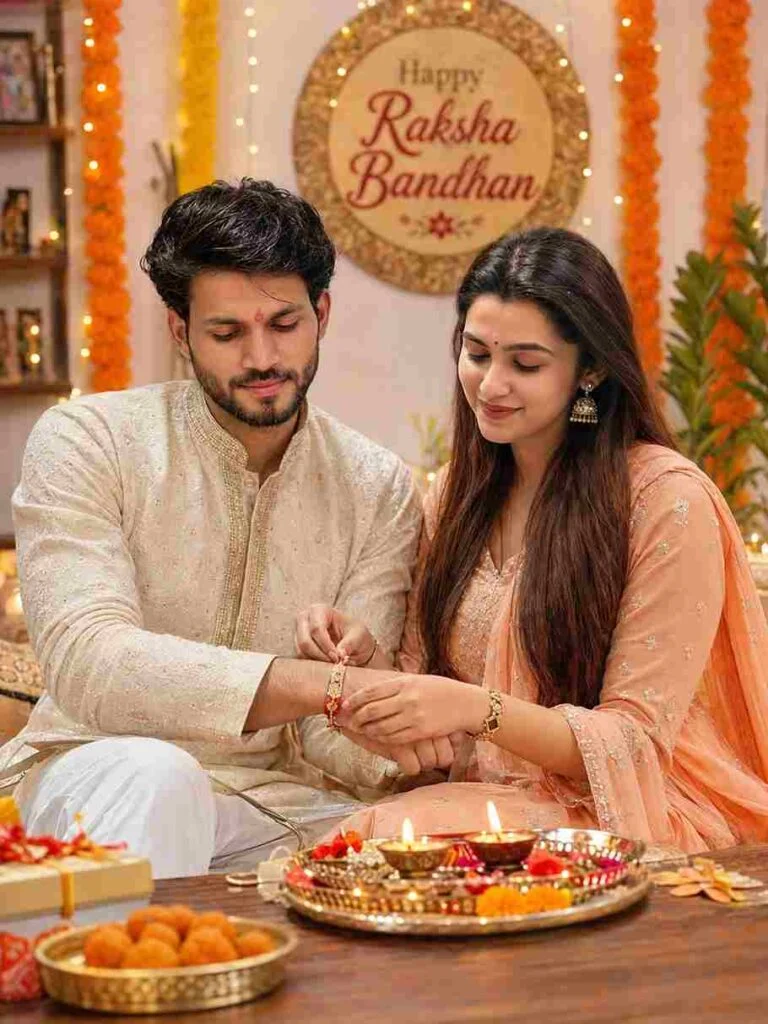
Ultra-realistic cinematic Indian Raksha Bandhan celebration photo of a young Indian brother and sister sitting together at home. 101% same face. The brother is wearing an elegant cream-colored embroidered kurta with white pajama, slightly curly textured black hair, neatly groomed beard, and a small red tilak on his forehead. The sister is wearing a beautiful pastel peach traditional salwar suit with delicate golden embroidery, matching dupatta, traditional jhumka earrings, bangles, and a small red bindi. The sister is lovingly tying a decorative red-and-gold Rakhi on her brother’s wrist while both look down at the Rakhi with warm, genuine smiles. A traditional puja thali filled with sweets, diya lamps, flowers, and Raksha Bandhan items is placed on a wooden table in the foreground. Background decorated beautifully with orange and yellow marigold flower garlands, warm fairy lights, and an elegant wall decoration with the text “Happy Raksha Bandhan”. Cozy Indian festive home atmosphere, warm golden lighting, soft cinematic bokeh, natural skin texture, realistic facial expressions, detailed traditional clothing, shallow depth of field, DSLR photography, 85mm lens, f/1.8, high dynamic range, photorealistic, ultra-detailed, 8K quality, vertical 3:4 composition.
AI Image Prompt
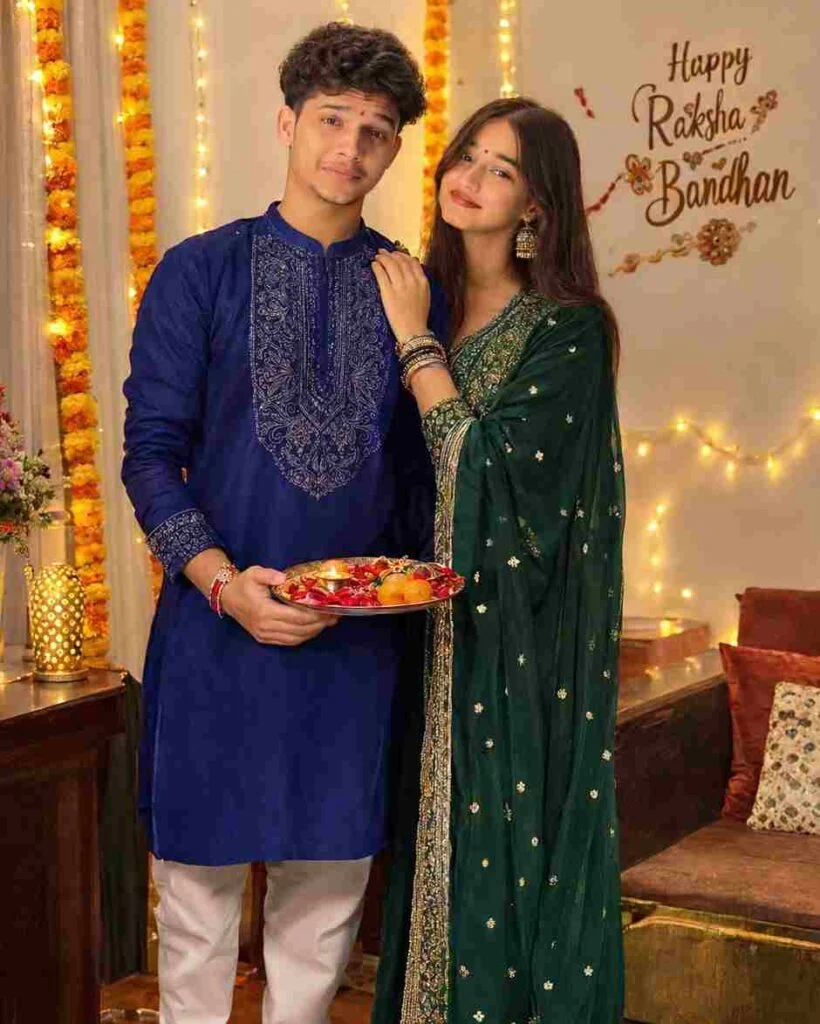
Ultra-realistic cinematic vertical 9:16 Raksha Bandhan family photo using the two uploaded reference images. Use the first image for the sister and second image for the brother. Preserve both faces exactly with strict identity lock—do not alter facial features, face shape, hairstyle, skin tone, age, or natural appearance.
Show the brother and sister standing together and posing naturally for a photo, smiling warmly at the camera with a loving sibling bond. The brother wears a deep royal blue embroidered kurta with white pajama, beard, curly black hair, and red tilak. The sister wears a deep emerald green embroidered salwar suit with matching dupatta, jhumkas, bangles, and red bindi. Rakhi should be visible on the brother’s wrist.
Add a decorated puja thali with sweets, diya, flowers, marigold garlands, warm fairy lights, and a “Happy Raksha Bandhan” wall decoration. Cozy Indian festive home, warm golden lighting, cinematic bokeh, realistic skin and hands, DSLR 85mm, f/1.8, photorealistic, ultra-detailed, natural colors, 8K quality.
Composition: Full-body/three-quarter standing portrait, both facing the camera, relaxed natural pose, balanced festive background, 4:5 . Do not change either person’s identity.
How to Create Raksha Bandhan AI Photos
Creating a Raksha Bandhan AI photo is simple, even if you are a beginner.
Step 1: Choose a Clear Photo
Select a high-quality photo where the faces are clearly visible. A front-facing image usually gives better results.
Step 2: Select an AI Photo Editing Tool
You can use tools such as:
ChatGPT
Leonardo AI
Adobe Firefly
Ideogram AI
Flux AI
Step 3: Upload Your Photo
Upload the brother-sister or family photo to the selected AI editor.
Step 4: Add Your Prompt
Copy one of the Raksha Bandhan prompts from this guide and paste it into the AI tool.
Step 5: Customise the Result
You can change details such as:
Traditional clothes
Background
Lighting
Rakhi design
Flowers
Jewellery
Pose
Festival decorations
Image style
Step 6: Generate and Refine
Generate the image and check the faces, hands, clothes, and background. If something looks unnatural, give the AI another instruction to fix it.
Best AI Tools for Raksha Bandhan Photo Editing
ChatGPT
ChatGPT can be useful for creating and editing AI images with detailed natural-language instructions. It is beginner-friendly because you can describe the look you want in simple words.
Google Gemini
Gemini can also help create creative festival visuals from detailed prompts. It is useful when you want to experiment with different compositions and styles.
Midjourney
Midjourney is popular for highly artistic and cinematic visuals. It can be a good option when you want a dramatic festival atmosphere.
Leonardo AI
Leonardo AI offers different image-generation and creative editing options. It can be useful for experimenting with realistic characters, backgrounds, and styles.
Adobe Firefly
Adobe Firefly is useful for creative image generation and editing, especially when you want to make controlled visual changes.
Tips for Better Raksha Bandhan AI Photo Results
Follow these simple tips to get more realistic results:
Use a clear, high-resolution source photo.
Mention that the original face should remain unchanged.
Clearly describe the clothes you want.
Mention the desired background.
Add lighting instructions such as warm or cinematic lighting.
Avoid adding too many unrelated objects.
Check hands and fingers carefully after generation.
Use realistic skin texture for a natural result.
Mention DSLR or professional photography if you want a realistic photo.
Generate multiple versions and choose the best one.
Common Problems With Raksha Bandhan AI Photos
Sometimes AI-generated festival photos may have small mistakes. Common problems include:
The face looks different from the original photo.
Hands or fingers look unnatural.
Rakhi appears incorrectly on the wrist.
Extra objects appear in the background.
Clothes contain strange patterns.
Facial expressions look unnatural.
Jewellery or accessories become distorted.
The text inside the image has spelling mistakes
To fix these problems, make your prompt more specific and ask the AI to preserve the original identity and correct the unwanted details.
Raksha Bandhan AI Photo Ideas for Social Media
After creating your AI photo, you can use it for:
Instagram posts
Instagram Stories
Facebook posts
WhatsApp Status
Raksha Bandhan greeting cards
YouTube thumbnails
Pinterest posts
Festival blog featured images
Digital greeting messages
You can also combine the AI image with a short Raksha Bandhan wish to create a personalised social media post.
Final Words
Raksha Bandhan is all about love, memories, and the special bond between brothers and sisters. With Raksha Bandhan AI Photo Editing Prompts 2026, you can turn ordinary family pictures into beautiful festive portraits without needing professional photography skills.
Choose a clear photo, use a detailed prompt, and tell the AI exactly what you want. Whether you prefer a traditional Rakhi ceremony, cinematic portrait, childhood memory, or modern Instagram-style image, AI tools give you many creative possibilities for celebrating Raksha Bandhan in 2026.